# iptablesiptables 是 Linux 防火墙工作在用户空间的管理工具,是 netfilter/iptables IP 信息包过滤系统是一部分,用来设置、维护和检查 Linux 内核的 IP 数据包过滤规则。
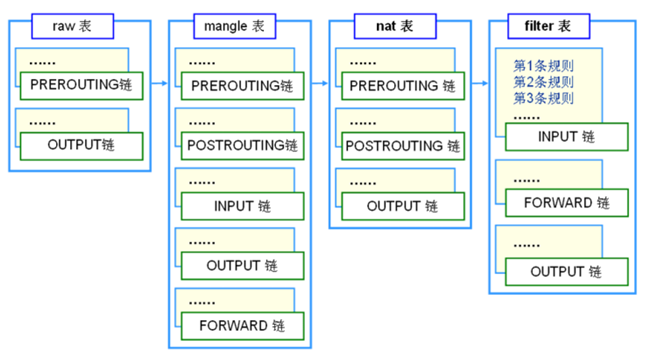
iptables 是集成在 Linux 内核中的包过滤防火墙 系统。使用 iptables 可以添加、删除具体的过滤规则,iptables 默认维护着 4 个表和 5 个链,所有的防火墙策略规则都被分别写入这些表与链中。
“四表” 是指 iptables 的功能,默认的 iptables 规则表有 filter 表(过滤规则表)、nat 表(地址转换规则表)、mangle(修改数据标记位规则表)、raw(跟踪数据表规则表):
五链” 是指内核中控制网络的 NetFilter 定义的 5 个规则链。每个规则表中包含多个数据链:INPUT(入站数据过滤)、OUTPUT(出站数据过滤)、FORWARD(转发数据过滤)、PREROUTING(路由前过滤)和 POSTROUTING(路由后过滤) ,防火墙规则需要写入到这些具体的数据链中。
iptables 的结构是由表(tables)组成,而 tables 是由链组成,链又是由具体的规则组成。因此我们在编写 iptables 规则时,要先指定表,再指定链。tables 的作用是区分不同功能的规则,并且存储这些规则。
filter 表:控制数据包是否允许进出及转发,可以控制的链路有 INPUT、FORWARD 和 OUTPUT。
nat 表:控制数据包中地址转换,可以控制的链路有 PREROUTING、INPUT、OUTPUT 和 POSTROUTING。
mangle:修改数据包中的原数据。它能改变 TCP 头中的 QoS 位。可以控制的链路有 PREROUTING、INPUT、OUTPUT、FORWARD 和 POSTROUTING。
raw:控制 nat 表中连接追踪机制的启用状况,可以控制的链路有 PREROUTING、OUTPUT。
优先级:raw > mangle > nat > filter
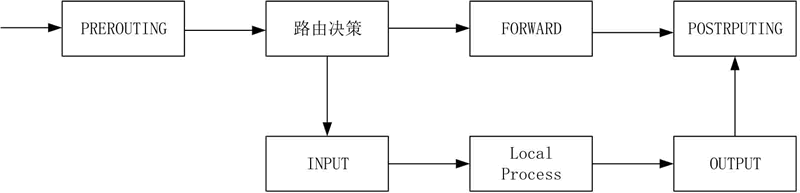
当一个数据包进入网卡时,它首先进入 PREROUTING 链,内核根据数据包目的 IP 判断是否需要转送出去。
如果数据包就是进入本机的,它就会沿着图向下移动,到达 INPUT 链。数据包到了 INPUT 链后,任何进程都会收到它。
本机上运行的程序可以发送数据包,这些数据包会经过 OUTPUT 链,然后到达 POSTROUTING 链输出。
如果数据包是要转发出去的,且内核允许转发,数据包就会如图所示向右移动,经过 FORWARD 链,然后到达 POSTROUTING 链输出。
如果是外部主机发送数据包给防火墙本机,数据将会经过 PREROUTING 链与 INPUT 链;
如果是防火墙本机发送数据包到外部主机,数据将会经过 OUTPUT 链与 POSTROUTING 链;
如果防火墙作为路由负责转发数据,则数据将经过 PREROUTING 链、FORWARD 链以及 POSTROUTING 链。
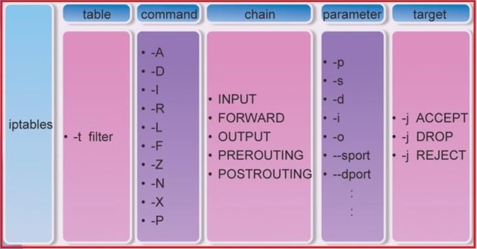
# iptables 语法iptables [-t table] command [链名] [条件匹配] [-j 目标动作]
如果满足条件,就执行目标 (target) 中的规则或者特定值。
如果不满足条件,就判断下一条 Rules。
-t:指定需要维护的防火墙规则表 filter、nat、mangle 或 raw。在不使用 -t 时则默认使用 filter 表。
COMMAND:子命令,定义对规则的管理。
chain:指明链表。
Parameter:匹配参数。
target:触发动作。
# command
选 项
功 能
-A
添加防火墙规则
-D
删除防火墙规则
-I
插入防火墙规则
-F
清空防火墙规则
-L
列出添加防火墙规则
-R
替换防火墙规则
-Z
清空防火墙数据表统计信息
-P
设置链默认规则
# parameter
参 数
功 能
-p
匹配协议,! 表示取反
-s
匹配源地址
-d
匹配目标地址
-i
匹配入站网卡接口
-o
匹配出站网卡接口
–sport
匹配源端口
–dport
匹配目标端口
–src-range
匹配源地址范围
–dst-range
匹配目标地址范围
-m limit --limit 匹配速率
四配数据表速率
-m mac --mac-source MAC
匹配源 MAC 地址
–sports
匹配源端口
–dports
匹配目标端口
-m state --state 状态
匹配状态(INVALID、ESTABLISHED、NEW、RELATED)
–string
匹配应用层字串
-–tcp-flags
SYN, ACK, FIN, RST, URG, PSH
-–icmp-type
0,8
# action
触发动作
功 能
ACCEPT
允许数据包通过
DROP
丢弃数据包
REJECT
拒绝数据包通过
LOG
将数据包信息记录 syslog 曰志
DNAT
目标地址转换
SNAT
源地址转换
MASQUERADE
地址欺骗
REDIRECT
重定向
内核会按照顺序依次检查 iptables 防火墙规则,如果发现有匹配的规则目录,则立刻执行相关动作,停止继续向下查找规则目录;如果所有的防火墙规则都未能匹配成功,则按照默认策略处理
如果没有 iptables,安装~
# 安装 iptables1 2 3 4 systemctl stop firewalld //关闭firewalld服务 yum -y install iptables-services systemctl start iptables //启动iptables vim /etc/sysconfig/iptables //iptables 配置实例
# 查看 iptables
-L 表示查看当前表的所有规则,默认查看的是 filter 表,如果要查看 nat 表,可以加上 -t nat 参数。
-n 表示不对 IP 地址进行反查,加上这个参数显示速度将会加快。
-v 表示输出详细信息,包含通过该规则的数据包数量、总字节数以及相应的网络接口。
1 2 3 4 5 6 7 8 9 10 11 12 13 14 15 16 17 18 19 20 21 22 23 24 25 26 27 28 29 30 31 32 33 34 35 36 37 38 39 40 41 42 43 44 [root@master ~]# iptables -nvL --line-number Chain INPUT (policy ACCEPT 3825K packets, 419M bytes) num pkts bytes target prot opt in out source destination Chain FORWARD (policy DROP 0 packets, 0 bytes) num pkts bytes target prot opt in out source destination 1 0 0 DOCKER-USER all -- * * 0.0.0.0/0 0.0.0.0/0 2 0 0 DOCKER-INGRESS all -- * * 0.0.0.0/0 0.0.0.0/0 3 0 0 DOCKER-ISOLATION-STAGE-1 all -- * * 0.0.0.0/0 0.0.0.0/0 4 0 0 ACCEPT all -- * docker0 0.0.0.0/0 0.0.0.0/0 ctstate RELATED,ESTABLISHED 5 0 0 DOCKER all -- * docker0 0.0.0.0/0 0.0.0.0/0 6 0 0 ACCEPT all -- docker0 !docker0 0.0.0.0/0 0.0.0.0/0 7 0 0 ACCEPT all -- docker0 docker0 0.0.0.0/0 0.0.0.0/0 8 0 0 ACCEPT all -- * docker_gwbridge 0.0.0.0/0 0.0.0.0/0 ctstate RELATED,ESTABLISHED 9 0 0 DOCKER all -- * docker_gwbridge 0.0.0.0/0 0.0.0.0/0 10 0 0 ACCEPT all -- docker_gwbridge !docker_gwbridge 0.0.0.0/0 0.0.0.0/0 11 0 0 DROP all -- docker_gwbridge docker_gwbridge 0.0.0.0/0 0.0.0.0/0 Chain OUTPUT (policy ACCEPT 3586K packets, 397M bytes) num pkts bytes target prot opt in out source destination Chain DOCKER (2 references) num pkts bytes target prot opt in out source destination Chain DOCKER-INGRESS (1 references) num pkts bytes target prot opt in out source destination 1 0 0 RETURN all -- * * 0.0.0.0/0 0.0.0.0/0 Chain DOCKER-ISOLATION-STAGE-1 (1 references) num pkts bytes target prot opt in out source destination 1 0 0 DOCKER-ISOLATION-STAGE-2 all -- docker0 !docker0 0.0.0.0/0 0.0.0.0/0 2 0 0 DOCKER-ISOLATION-STAGE-2 all -- docker_gwbridge !docker_gwbridge 0.0.0.0/0 0.0.0.0/0 3 0 0 RETURN all -- * * 0.0.0.0/0 0.0.0.0/0 Chain DOCKER-ISOLATION-STAGE-2 (2 references) num pkts bytes target prot opt in out source destination 1 0 0 DROP all -- * docker0 0.0.0.0/0 0.0.0.0/0 2 0 0 DROP all -- * docker_gwbridge 0.0.0.0/0 0.0.0.0/0 3 0 0 RETURN all -- * * 0.0.0.0/0 0.0.0.0/0 Chain DOCKER-USER (1 references) num pkts bytes target prot opt in out source destination 1 0 0 RETURN all -- * * 0.0.0.0/0 0.0.0.0/0
# 备份和还原默认的 iptables 防火墙规则会立刻生效,但如果不保存,当计算机重启后所有的规则都会丢失
iptables-save 和 iptables-restore,使用该工具可以实现防火墙规则的保存与还原。这两个工具的最大优势是处理庞大的规则集时速度非常快。
# iptables-saveiptables-save 命令用来批量导出 Linux 防火墙规则,语法介绍如下:
保存在默认文件夹中(保存防火墙规则): iptables-save > /etc/sysconfig/iptables
保存在其他位置(备份防火墙规则): iptables-save > 文件名称
# iptables-restoreiptables-restore 命令可以批量导入 Linux 防火墙规则,同时也需要结合重定向输入来指定备份文件的位置。命令如下:
iptables-restore < 文件名称
# 实例1 2 3 4 5 6 7 8 9 10 11 12 13 14 15 16 17 18 19 20 21 22 23 24 25 26 27 28 29 30 31 32 33 34 35 36 37 38 39 40 41 42 43 44 45 46 47 48 49 50 51 iptables -A INPUT -j ACCEPT iptables -A FORWARD -s 10.10.10.10 -j DROP iptables -t nat -A POSTROUTING -s 192.168.1.0/24 -j SNAT --to 18.18.18.18 iptables -t nat -A POSTROUTING -s 192.168.1.0/24 -j SNAT --to 18.18.18.18-18.18.18.28 iptables -t nat -A PREROUTING -i eth0 -p tcp --dport 80 -j DNAT --to 192.168.1.1 iptables -t nat -A PREROUTING -i eth0 -p tcp --dport 80 -j DNAT --to 192.168.1.1-192.168.1.10 iptables -t nat -A POSTROUTING -s 192.168.1.0/24 -o eth0 -j MASQUERADE iptables -A INPUT -i eth0 -p tcp --dport 22 -m state --state NEW,ESTABLISHED -j ACCEPT iptables -A OUTPUT -o eth0 -p tcp --sport 22 -m state --state ESTABLISHED -j ACCEPT iptables -A OUTPUT -o eth0 -p tcp --dport 22 -m state --state NEW,ESTABLISHED -j ACCEPT iptables -A INPUT -i eth0 -p tcp --sport 22 -m state --state ESTABLISHED -j ACCEPT iptables -A INPUT -i eth0 -p tcp --dport 80 -m state --state NEW,ESTABLISHED -j ACCEPT iptables -A OUTPUT -o eth0 -p tcp --sport 80 -m state --state ESTABLISHED -j ACCEPT iptables -t nat -I PREROUTING -p tcp --dport 3389 -j DNAT --to x.x.x.x iptables -t nat -I POSTROUTING -p tcp --dport 3389 -j MASQUERADE iptables -t nat -A PREROUTING -p tcp -m tcp --dport 63306 -j DNAT --to-destination 127.0.0.1:3306 iptables -t nat -A POSTROUTING -p tcp -m tcp --dport 63306 -j SNAT --to-source 127.0.0.1 iptables -t nat -R PREROUTING 4 -s 192.168.40.154 -p tcp -m tcp --dport 63306 -j DNAT --to-destination 127.0.0.1:3306 iptables -t nat -R POSTROUTING 4 -s 192.168.40.154 -p tcp -m tcp --dport 63306 -j SNAT --to-source 127.0.0.1 iptables -A INPUT -m state --state RELATED,ESTABLISHED -j ACCEPT iptables -A INPUT -m mac --mac-source xx:xx:xx:xx:xx:xx -j DROP iptables -A FORWARD -d 192.168.1.1 -m limit --limit 50/s -j ACCEPT iptables -A INPUT -p tcp -m multiport --dports 22,53,80,443 -j ACCEPT
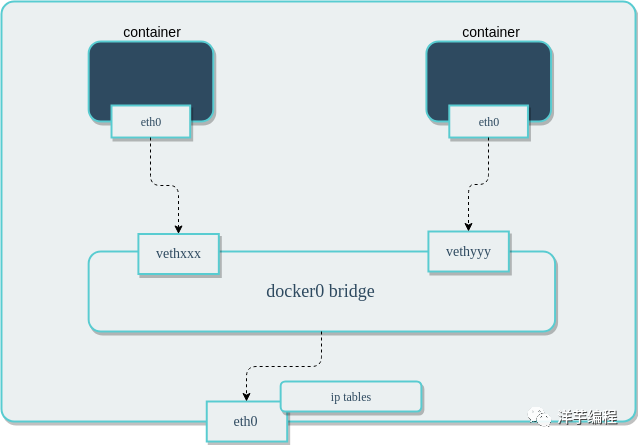
# docker 网络Docker 原生网络是基于 Linux 的 网络命名空间(net namespace) 和 虚拟网络设备(veth pair)实现的。当 Docker 进程启动时,会在宿主机上创建一个名称为 docker0 的 虚拟网桥,在该宿主机上启动的 Docker 容器会连接到这个虚拟网桥上。
虚拟网桥的工作方式和物理交换机类似,宿主机上所有的容器通过虚拟网桥连接在一个二层网络中。
从 docker0 子网中分配一个 IP 给容器使用,并设置 docker0 的 IP 地址为容器的默认网关。在宿主机上创建一对虚拟网卡 veth pair 设备, Docker 将 veth pair 设备的一端放在新创建的容器中,并命名为 eth0(容器的网卡), 另一端放在宿主机中,以 vethxxx 类似的名字命名, 并将这个网络设备连接到 docker0 网桥中。
1 2 3 4 5 6 7 8 9 10 11 12 13 14 15 16 17 18 19 [root@hecs-346515 ~] 3: docker0: <NO-CARRIER,BROADCAST,MULTICAST,UP> mtu 1500 qdisc noqueue state DOWN group default link /ether 02:42:27:32:a6:49 brd ff:ff:ff:ff:ff:ff inet 172.17.0.1/16 brd 172.17.255.255 scope global docker0 valid_lft forever preferred_lft forever inet6 fe80::42:27ff:fe32:a649/64 scope link valid_lft forever preferred_lft forever 260: veth95b76a5@if259: <BROADCAST,MULTICAST,UP,LOWER_UP> mtu 1500 qdisc noqueue master br-5ed45bf78d6f state UP group default link /ether 72:7e:42:35:8b:de brd ff:ff:ff:ff:ff:ff link-netnsid 0 inet6 fe80::707e:42ff:fe35:8bde/64 scope link valid_lft forever preferred_lft forever [root@hecs-346515 ~] 259: eth0@if260: <BROADCAST,MULTICAST,UP,LOWER_UP,M-DOWN> mtu 1500 qdisc noqueue state UP link /ether 02:42:ac:15:00:02 brd ff:ff:ff:ff:ff:ff inet 172.21.0.2/16 brd 172.21.255.255 scope global eth0 valid_lft forever preferred_lft forever
Docker 会自动配置 iptables 规则和配置 NAT,便于连通宿主机上的 docker0 网桥,完成这些操作之后,容器就可以使用它的 eth0 虚拟网卡,来连接其他容器和访问外部网络。
Docker 中的网络接口默认都是虚拟的接口,Linux 在内核中通过 数据复制 实现接口之间的数据传输,可以充分发挥数据在不同 Docker 容器或容器与宿主机之间的转发效率, 发送接口发送缓存中的数据包,将直接复制到接收接口的缓存中,无需通过物理网络设备进行交换。
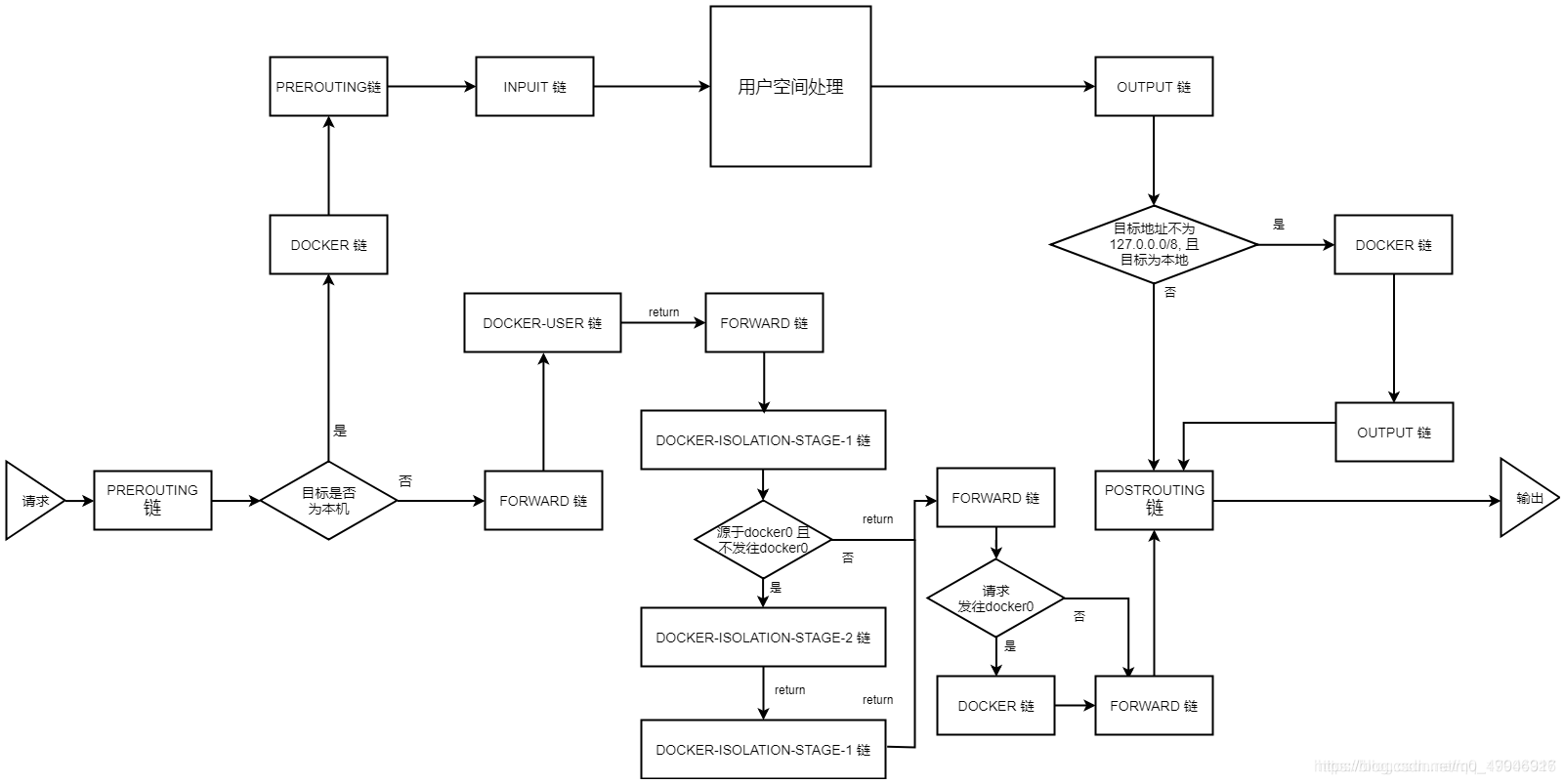
虚拟网桥 docker0 通过 iptables 配置与宿主机器上的网卡相连,符合条件的请求都会通过 iptables 转发到 docker0, 然后分发给对应的容器。
# docker 中网络模式
名称
描述
bridge
默认的网络设备,当应用程序所在的容器需要通信时使用
host
移除容器与宿主机之间的网络隔离,直接使用宿主机的网络
overlay
将多个容器连接,并使集群服务能够相互通信
ipvlan
使用户可以完全控制 IPv4 和 IPv6 寻址
macvlan
可以为容器分配 MAC 地址
none
禁用所有网络
Network plugins
通过 Docker 安装和使用第三方网络插件
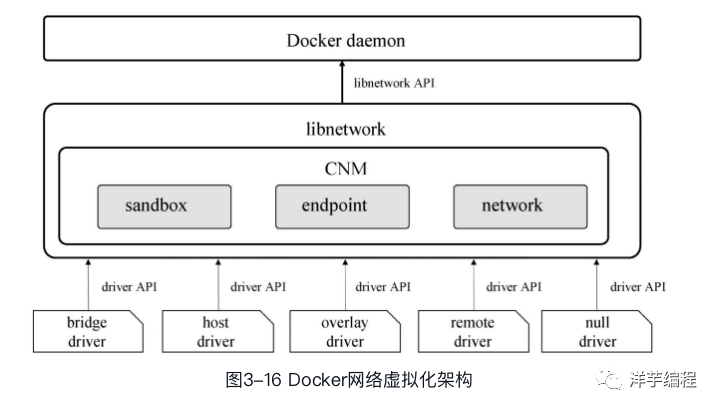
Docker daemon 通过调用 libnetwork 提供的 API 完成网络的创建和管理等功能。libnetwork 中使用了 CNM 来完成网络功能, CNM 中主要有沙盒(sandbox)、端点(endpoint)和网络(network)3 种组件。
・沙盒:一个沙盒包含了一个容器网络栈的信息。一个沙盒可以有多个端点和多个网络,沙盒可以对容器的接口、路由和 DNS 设置等进行管理,沙盒的实现可以是 Linux network namespace、FreeBSD Jail 或者类似的机制
・端点:一个端点可以加入一个沙盒和一个网络。一个端点只属于一个网络和一个沙盒,端点的实现可以是 veth pair、Open vSwitch 内部端口或者相似的设备
・网络:一个网络是一组可以直接互相联通的端点。一个网络可以包含多个端点,网络的实现可以是 Linux bridge、VLAN 等
bridge
bridge 是默认的网络模式,为容器创建独立的网络命名空间,容器具有独立的网卡等所有的网络栈。使用该模式的 ** 所有容器都是连接到 docker0 这个网桥, 作为 虚拟交换机使容器可以相互通信,** 但是由于宿主机的 IP 地址与容器 veth pair 的 IP 地址不在同一个网段,所以为了和宿主机以外的网络通信, Docker 采用了端口绑定的方式,也就是通过 iptables 的 NAT,将宿主机上的端口流量转发到容器。
外界通信时使用 NAT,增加了通信的复杂性,在复杂场景下使用会有限制。
1 2 3 4 5 6 7 8 9 10 11 12 13 14 15 16 17 18 19 20 21 22 23 24 $ docker network inspect bridge [ { "Name" : "bridge" , "Scope" : "local" , "Driver" : "bridge" , "EnableIPv6" : false , "IPAM" : { "Driver" : "default" , "Options" : null, "Config" : [ { "Subnet" : "172.17.0.0/16" , "Gateway" : "172.17.0.1" } ] }, "Containers" : { }, } ]
虚拟网桥 的 IP 地址就是 bridge 网络类型的容器的网关地址。
在 iptables 做了 DNAT 规则,实现端口转发功能:
1 2 3 4 5 6 [root@hecs-346515 ~] Chain DOCKER (2 references) num pkts bytes target prot opt in out source destination 6 847 44652 DNAT tcp -- !br-5ed45bf78d6f * 0.0.0.0/0 0.0.0.0/0 tcp dpt:8080 to:172.21.0.3:8080
当容器需要将端口映射到宿主机时,Docker 会自动为该容器分配一个 IP 地址,同时新增一个 iptables 规则。
容器 iptables 详解会在后面详细说明,先记住有 docker 这么一条链即可
host
容器不会获得一个独立的网络命名空间,而是和宿主机共用一个。容器不会虚拟出自己的网卡,配置自己的 IP 等,而是直接使用宿宿主机的。但是容器的其他方面,如文件系统、进程列表等还是和宿宿主机隔离的,容器对外界是完全开放的,能够访问到宿主机,就能访问到容器。
host 模式降低了容器与容器之间、容器与宿主机之间网络层面的隔离性,虽然有性能上的优势,但是引发了网络资源的竞争与冲突,因此适用于容器集群规模较小的场景。
1 2 3 4 5 6 7 8 9 10 11 12 13 14 15 16 17 18 19 20 21 22 23 24 25 26 27 28 29 30 31 32 33 34 35 docker run -d --net host nginx docker network inspect host [ { "Name" : "host" , "Scope" : "local" , "Driver" : "host" , "Internal" : false , "Attachable" : false , "Ingress" : false , "ConfigFrom" : { "Network" : "" }, "Containers" : { "f202870092fc40bc08a607dddbb2770df9bb4534475b066f45ea35252d6e76e2" : { "Name" : "frosty_napier" , "EndpointID" : "7306a8e4103faf4edd081182f015fa9aa985baf3560f4a49b9045c00dc603190" , "MacAddress" : "" , "IPv4Address" : "" , "IPv6Address" : "" } }, } ] [root@hecs-346515 ~] tcp 0 0 0.0.0.0:80 0.0.0.0:* LISTEN 19407/nginx: master tcp 0 0 0.0.0.0:8080 0.0.0.0:* LISTEN 7873/docker-proxy tcp6 0 0 :::80 :::* LISTEN 19407/nginx: master tcp6 0 0 :::8080 :::* LISTEN 7877/docker-proxy
none
容器拥有自己的 Network Namespace,但是并不进行任何网络配置。也就意味着该容器没有网卡、IP、路由等信息,需要手动为容器添加网卡、配置 IP 等, none 模式下的容器会完全隔离,容器中只有 lo 这个 loopback(回环网络)网卡用于进程通信。
none 模式为容器做了最少的网络设置,在没有网络配置的情况下,通过自定义配置容器的网络,提供了最高的灵活性。
1 2 3 4 5 6 7 8 9 10 11 12 13 14 15 16 17 18 19 20 21 22 23 24 docker network insepct none [ { "Name" : "none" , "Scope" : "local" , "Driver" : "null" , "Internal" : false , "Attachable" : false , "Ingress" : false , "ConfigFrom" : { "Network" : "" }, "Containers" : { "d2d0606b7d2429c224e61e06c348019b74cd47f0b8c85347a7cdb8f1e30dcf86" : { "Name" : "hardcore_chebyshev" , "EndpointID" : "b8ff645671518e608f403818a31b1db34d7fce66af60373346ea3ab673a4c6b2" , "MacAddress" : "" , "IPv4Address" : "" , "IPv6Address" : "" } }, } ]
container
与 host 模式类似,** 容器与指定的容器共享网络命名空间。这两个容器之间不存在网络隔离,但它们与宿主机以及其他的容器存在网络隔离。** 该模式下的容器可以通过 localhost 来访问同一网络命名空间下的其他容器,传输效率较高,且节约了一定的网络资源。在一些特殊的场景中非常有用,例如 k8s 的 Pod。
当需要多个容器在同一台宿主机上进行通信时,使用 bridge
当网络栈不应该与宿主机隔离,但是希望容器的其他方面被隔离时,使用 host
当需要在不同宿主机上运行的容器进行通信时,使用 overlay
当从虚拟机迁移或需要使容器看起来像物理宿主机时,使用 Macvlan, 每个容器都有一个唯一的 MAC 地址
当需要将 Docker 与专门的网络栈集成,使用 Third-party
# 前置知识:iptables 自定义链当默认链中的规则非常多时,不方便我们管理。
想象一下,如果 INPUT 链中存放了 200 条规则,这 200 条规则有针对 httpd 服务的,有针对 sshd 服务的,有针对私网 IP 的,有针对公网 IP 的,假如,我们突然想要修改针对 httpd 服务的相关规则,难道我们还要从头看一遍这 200 条规则,找出哪些规则是针对 httpd 的吗?这显然不合理。
iptables 中,可以自定义链,通过自定义链即可解决上述问题。
假设,我们自定义一条链,链名叫 IN_WEB,我们可以将所有针对 80 端口的入站规则都写入到这条自定义链中,当以后想要修改针对 web 服务的入站规则时,就直接修改 IN_WEB 链中的规则就好了
自定义链并不能直接使用,而是需要被默认链引用才能够使用
1 2 3 4 5 6 7 8 9 10 11 12 13 14 15 16 17 18 19 20 21 22 23 24 25 26 27 28 29 30 31 32 33 34 35 36 37 38 39 40 [root@hecs-346515 ~] [root@hecs-346515 ~] Chain IN_WEB (0 references) num pkts bytes target prot opt in out source destination [root@hecs-346515 ~] [root@hecs-346515 ~] [root@hecs-346515 ~] [root@hecs-346515 ~] Chain INPUT (policy ACCEPT 27 packets, 1664 bytes) num pkts bytes target prot opt in out source destination 1 0 0 IN_WEB tcp -- * * 0.0.0.0/0 0.0.0.0/0 tcp dpt:80 Chain IN_WEB (1 references) num pkts bytes target prot opt in out source destination 1 0 0 REJECT all -- * * 10.1.1.2 0.0.0.0/0 reject-with icmp-port-unreachable 2 0 0 ACCEPT tcp -- * eth0 0.0.0.0/0 0.0.0.0/0 tcp dpt:22 state ESTABLISHED [root@hecs-346515 ~] [root@hecs-346515 ~] iptables: Too many links. [root@hecs-346515 ~] [root@hecs-346515 ~] iptables: Directory not empty. [root@hecs-346515 ~] [root@hecs-346515 ~]
# docker 中 iptables虚拟网桥 docker0 通过 iptables 配置与宿主机器上的网卡相连,符合条件的请求都会通过 iptables 转发到 docker0, 然后分发给对应的容器。
在 2015.12 之前,Docker 只额外提供了 DOCKER 链。
在此之后,直到 Docker 17.06.0(2017.6)之前的版本中,Docker 提供了如下 2 个链:
DOCKER
在 Docker 17.06.0(2017.6)及之后,Docker 18.03.1(2018.4)及之前的版本中,Docker 提供了如下 3 个链:
DOCKER
在 Docker 18.05.0(2018.5)及之后的版本中,提供如下 4 个 chain:
DOCKER
DOCKER-ISOLATION-STAGE-1 DOCKER-ISOLATION-STAGE-2 DOCKER-USER
Docker 的 DOCKER 链
仅处理从宿主机到 docker0 的 IP 数据包,即容器对外的规则
Docker 的 DOCKER-ISOLATION 链
为了隔离在不同的 bridge 网络之间的容器,Docker 提供了两个 DOCKER-ISOLATION 阶段实现。
DOCKER-ISOLATION-STAGE-1 链过滤源地址是 bridge 网络(默认 docker0)的 IP 数据包,目的地不是 docker0 ,匹配的 IP 数据包再进入 DOCKER-ISOLATION-STAGE-2 链处理,不匹配就返回到父链 FORWARD。
在 DOCKER-ISOLATION-STAGE-2 链中,进一步处理目的地址是 bridge 网络的 IP 数据包 ,匹配的 IP 数据包表示该 IP 数据包是从一个 bridge 网络的网桥发出,到另一个 bridge 网络的网桥,这样的 IP 数据包来自其他 bridge 网络,将被直接 DROP;不匹配的 IP 数据包就返回到父链 FORWARD 继续进行后续处理。
即不允许不同的网卡互相访问,这对于 docker-compose 非常有用 iptables -A DOCKER-ISOLATION-STAGE-2 -o br-afba712bfb32 -j DROP
Docker 的 DOCKER-USER 链
Docker 启动时,会加载 DOCKER 链和 DOCKER-ISOLATION(现在是 DOCKER-ISOLATION-STAGE-1)链中的过滤规则,并使之生效。绝对禁止修改这里的过滤规则。
如果用户要补充 Docker 的过滤规则,强烈建议追加到 DOCKER-USER 链。DOCKER-USER 链中的过滤规则,将先于 Docker 默认创建的规则被加载,从而能够覆盖 Docker 在 DOCKER 链和 DOCKER-ISOLATION 链中的默认过滤规则。
例如,Docker 启动后,默认任何外部 source IP 都被允许转发,从而能够从该 source IP 连接到宿主机上的任何 Docker 容器实例。如果只允许一个指定的 IP 访问容器实例,可以插入路由规则到 DOCKER-USER 链中,从而能够在 DOCKER 链之前被加载。示例如下:
1 2 3 4 iptables -A DOCKER-USER -i docker0 ! -s 192.168.1.1 -j DROP iptables -A DOCKER-USER -i docker0 ! -s 192.168.1.0/24 -j DROP iptables -A DOCKER-USER -m iprange -i docker0 ! --src-range 192.168.1.1-192.168.1.3 -j DROP
Docker 在 iptables 的 nat 表中的规则
为了能够从容器中访问其他 Docker 宿主机,Docker 需要在 iptables 的 nat 表中的 POSTROUTING 链中插入转发规则。
即 container 使用宿主机 docker0 的 IP 作为网关,便于接收外部返回的数据,示例如下:
1 iptables -t nat -A POSTROUTING -s 172.18.0.0/16 -j MASQUERADE
宿主机通过 nat 表的 OUTPUT 链是可以访问 container 的
nat 表的 POSTROUTING 规则使得 container 可以访问外网
Docker 中禁止修改 iptables 过滤表
dockerd 启动时,参数–iptables 默认为 true,表示允许修改 iptables 过滤表。
要禁用该功能,可以有两个选择:
设置启动参数–iptables=false
修改配置文件 /etc/docker/daemon.json,设置 "iptables": “false”;然后执行 systemctl reload docker 重新加载
docker 操作规则提供网络隔离,不应该修改 Docker 插入到策略中的规则。
如果您正在一个暴露于 Internet 的主机上运行 Docker,那么您可能需要使用 iptables 策略来防止未经授权地访问在您的主机上运行的容器或其他服务。
在 docker 的规则之后添加 iptables 规则:
Docker 安装了两个名为 `DOCKER-USER``DOCKER 自定义 iptables 链,并确保传入的数据包总是首先由这两个链检查。
Docker 的所有规则都添加到 DOCKER 链中。不要手动操作此链。如果需要添加在 Docker 规则之前加载的规则,请将它们添加到链中。在 Docker 自动创建任何规则之前应用这些规则。
为容器设置默认绑定地址
默认情况下,Docker 守护进程将公开 0.0.0.0 地址上的端口,即主机上的任何地址。如果希望将该行为更改为仅公开内部 IP 地址上的端口,则可以使用 --ip 选项指定不同的 IP 地址。
1 2 3 4 5 6 7 8 9 10 11 12 13 14 15 16 17 18 19 20 21 22 23 24 25 26 27 28 29 30 31 32 33 34 35 36 37 38 39 40 41 42 43 44 45 46 47 48 49 50 51 52 53 54 55 56 57 58 59 60 61 62 63 64 65 66 67 68 69 70 [root@hecs-346515 ~] Chain INPUT (policy ACCEPT 325K packets, 57M bytes) num pkts bytes target prot opt in out source destination Chain FORWARD (policy ACCEPT 0 packets, 0 bytes) num pkts bytes target prot opt in out source destination 1 11650 1109K DOCKER-USER all -- * * 0.0.0.0/0 0.0.0.0/0 2 11650 1109K DOCKER-ISOLATION-STAGE-1 all -- * * 0.0.0.0/0 0.0.0.0/0 3 2853 225K ACCEPT all -- * br-73c5128a4cfc 0.0.0.0/0 0.0.0.0/0 ctstate RELATED,ESTABLISHED 4 613 35444 DOCKER all -- * br-73c5128a4cfc 0.0.0.0/0 0.0.0.0/0 5 2820 319K ACCEPT all -- br-73c5128a4cfc !br-73c5128a4cfc 0.0.0.0/0 0.0.0.0/0 6 0 0 ACCEPT all -- br-73c5128a4cfc br-73c5128a4cfc 0.0.0.0/0 0.0.0.0/0 7 3075 327K ACCEPT all -- * br-5ed45bf78d6f 0.0.0.0/0 0.0.0.0/0 ctstate RELATED,ESTABLISHED 8 767 41232 DOCKER all -- * br-5ed45bf78d6f 0.0.0.0/0 0.0.0.0/0 9 3184 336K ACCEPT all -- br-5ed45bf78d6f !br-5ed45bf78d6f 0.0.0.0/0 0.0.0.0/0 10 0 0 ACCEPT all -- br-5ed45bf78d6f br-5ed45bf78d6f 0.0.0.0/0 0.0.0.0/0 11 12131 17M ACCEPT all -- * br-a1c8315f1897 0.0.0.0/0 0.0.0.0/0 ctstate RELATED,ESTABLISHED 12 104 5928 DOCKER all -- * br-a1c8315f1897 0.0.0.0/0 0.0.0.0/0 13 5982 1555K ACCEPT all -- br-a1c8315f1897 !br-a1c8315f1897 0.0.0.0/0 0.0.0.0/0 14 46 2760 ACCEPT all -- br-a1c8315f1897 br-a1c8315f1897 0.0.0.0/0 0.0.0.0/0 15 0 0 ACCEPT all -- * br-362bcfa74398 0.0.0.0/0 0.0.0.0/0 ctstate RELATED,ESTABLISHED 16 0 0 DOCKER all -- * br-362bcfa74398 0.0.0.0/0 0.0.0.0/0 17 0 0 ACCEPT all -- br-362bcfa74398 !br-362bcfa74398 0.0.0.0/0 0.0.0.0/0 18 0 0 ACCEPT all -- br-362bcfa74398 br-362bcfa74398 0.0.0.0/0 0.0.0.0/0 19 28865 53M ACCEPT all -- * docker0 0.0.0.0/0 0.0.0.0/0 ctstate RELATED,ESTABLISHED 20 0 0 DOCKER all -- * docker0 0.0.0.0/0 0.0.0.0/0 21 27196 1524K ACCEPT all -- docker0 !docker0 0.0.0.0/0 0.0.0.0/0 22 0 0 ACCEPT all -- docker0 docker0 0.0.0.0/0 0.0.0.0/0 23 101K 118M ACCEPT all -- * br-7e6516f6eadc 0.0.0.0/0 0.0.0.0/0 ctstate RELATED,ESTABLISHED 24 583 35272 DOCKER all -- * br-7e6516f6eadc 0.0.0.0/0 0.0.0.0/0 25 1 44 ACCEPT all -- br-7e6516f6eadc !br-7e6516f6eadc 0.0.0.0/0 0.0.0.0/0 26 582 35232 ACCEPT all -- br-7e6516f6eadc br-7e6516f6eadc 0.0.0.0/0 0.0.0.0/0 27 54 4536 ACCEPT all -- * br-82c4a8b68c66 0.0.0.0/0 0.0.0.0/0 ctstate RELATED,ESTABLISHED 28 2 168 DOCKER all -- * br-82c4a8b68c66 0.0.0.0/0 0.0.0.0/0 29 0 0 ACCEPT all -- br-82c4a8b68c66 !br-82c4a8b68c66 0.0.0.0/0 0.0.0.0/0 30 2 168 ACCEPT all -- br-82c4a8b68c66 br-82c4a8b68c66 0.0.0.0/0 0.0.0.0/0 31 0 0 ACCEPT all -- * br-57ffa6ffd57d 0.0.0.0/0 0.0.0.0/0 ctstate RELATED,ESTABLISHED 32 0 0 DOCKER all -- * br-57ffa6ffd57d 0.0.0.0/0 0.0.0.0/0 33 0 0 ACCEPT all -- br-57ffa6ffd57d !br-57ffa6ffd57d 0.0.0.0/0 0.0.0.0/0 34 0 0 ACCEPT all -- br-57ffa6ffd57d br-57ffa6ffd57d 0.0.0.0/0 0.0.0.0/0 Chain OUTPUT (policy ACCEPT 223K packets, 22M bytes) num pkts bytes target prot opt in out source destination Chain DOCKER (8 references) num pkts bytes target prot opt in out source destination 1 767 41232 ACCEPT tcp -- !br-5ed45bf78d6f br-5ed45bf78d6f 0.0.0.0/0 172.21.0.3 tcp dpt:8080 Chain DOCKER-ISOLATION-STAGE-1 (1 references) num pkts bytes target prot opt in out source destination 1 2820 319K DOCKER-ISOLATION-STAGE-2 all -- br-73c5128a4cfc !br-73c5128a4cfc 0.0.0.0/0 0.0.0.0/0 2 3184 336K DOCKER-ISOLATION-STAGE-2 all -- br-5ed45bf78d6f !br-5ed45bf78d6f 0.0.0.0/0 0.0.0.0/0 3 5982 1555K DOCKER-ISOLATION-STAGE-2 all -- br-a1c8315f1897 !br-a1c8315f1897 0.0.0.0/0 0.0.0.0/0 4 0 0 DOCKER-ISOLATION-STAGE-2 all -- br-362bcfa74398 !br-362bcfa74398 0.0.0.0/0 0.0.0.0/0 5 27196 1524K DOCKER-ISOLATION-STAGE-2 all -- docker0 !docker0 0.0.0.0/0 0.0.0.0/0 6 87590 74M RETURN all -- * * 0.0.0.0/0 0.0.0.0/0 Chain DOCKER-ISOLATION-STAGE-2 (5 references) num pkts bytes target prot opt in out source destination 1 0 0 DROP all -- * br-73c5128a4cfc 0.0.0.0/0 0.0.0.0/0 2 0 0 DROP all -- * br-5ed45bf78d6f 0.0.0.0/0 0.0.0.0/0 3 0 0 DROP all -- * br-a1c8315f1897 0.0.0.0/0 0.0.0.0/0 4 0 0 DROP all -- * br-362bcfa74398 0.0.0.0/0 0.0.0.0/0 5 0 0 DROP all -- * docker0 0.0.0.0/0 0.0.0.0/0 6 39182 3735K RETURN all -- * * 0.0.0.0/0 0.0.0.0/0 Chain DOCKER-USER (1 references) num pkts bytes target prot opt in out source destination 1 248K 299M RETURN all -- * * 0.0.0.0/0 0.0.0.0/0
1 2 3 4 5 6 7 8 9 10 11 12 13 14 15 16 17 18 19 20 21 22 23 24 25 26 27 28 29 30 31 32 33 [root@hecs-346515 ~] Chain PREROUTING (policy ACCEPT 147K packets, 27M bytes) num pkts bytes target prot opt in out source destination 1 311K 37M DOCKER all -- * * 0.0.0.0/0 0.0.0.0/0 ADDRTYPE match dst-type LOCAL Chain INPUT (policy ACCEPT 147K packets, 27M bytes) num pkts bytes target prot opt in out source destination Chain OUTPUT (policy ACCEPT 16537 packets, 1079K bytes) num pkts bytes target prot opt in out source destination 1 0 0 DOCKER all -- * * 0.0.0.0/0 !127.0.0.0/8 ADDRTYPE match dst-type LOCAL Chain POSTROUTING (policy ACCEPT 17105 packets, 1109K bytes) num pkts bytes target prot opt in out source destination 1 0 0 MASQUERADE all -- * !br-73c5128a4cfc 172.22.0.0/16 0.0.0.0/0 2 0 0 MASQUERADE all -- * !br-5ed45bf78d6f 172.21.0.0/16 0.0.0.0/0 3 73 4572 MASQUERADE all -- * !br-a1c8315f1897 172.20.0.0/16 0.0.0.0/0 4 0 0 MASQUERADE all -- * !br-362bcfa74398 172.19.0.0/16 0.0.0.0/0 5 18 1120 MASQUERADE all -- * !docker0 172.17.0.0/16 0.0.0.0/0 6 0 0 MASQUERADE all -- * !br-7e6516f6eadc 172.38.0.0/16 0.0.0.0/0 7 0 0 MASQUERADE all -- * !br-82c4a8b68c66 10.1.0.0/16 0.0.0.0/0 8 0 0 MASQUERADE all -- * !br-57ffa6ffd57d 172.18.0.0/16 0.0.0.0/0 9 0 0 MASQUERADE tcp -- * * 172.21.0.3 172.21.0.3 tcp dpt:8080 Chain DOCKER (2 references) num pkts bytes target prot opt in out source destination 1 0 0 RETURN all -- br-73c5128a4cfc * 0.0.0.0/0 0.0.0.0/0 2 0 0 RETURN all -- br-5ed45bf78d6f * 0.0.0.0/0 0.0.0.0/0 3 0 0 RETURN all -- br-a1c8315f1897 * 0.0.0.0/0 0.0.0.0/0 4 0 0 RETURN all -- br-362bcfa74398 * 0.0.0.0/0 0.0.0.0/0 5 0 0 RETURN all -- docker0 * 0.0.0.0/0 0.0.0.0/0 6 743 39312 DNAT tcp -- !br-5ed45bf78d6f * 0.0.0.0/0 0.0.0.0/0 tcp dpt:8080 to:172.21.0.3:8080
1 2 3 4 5 6 7 8 9 10 [root@hecs-346515 ~]# docker network ls NETWORK ID NAME DRIVER SCOPE 5ed45bf78d6f app_default bridge local 20518cecd94f bridge bridge local 73c5128a4cfc com-nginx_default bridge local 362bcfa74398 composetest_default bridge local a919986fdc8c host host local a1c8315f1897 my_wordpress_default bridge local a0d53da9cf10 none null local
# Kubernetes 下的 iptables下面是一个 kubernetes 环境下的的 iptables
1 2 3 4 5 6 7 8 9 10 11 12 13 14 15 16 17 18 19 20 21 22 23 24 25 26 27 28 29 30 31 32 33 34 35 36 37 38 39 40 41 42 43 44 45 46 47 48 49 50 51 52 53 54 55 56 57 58 59 60 61 62 63 64 65 66 67 68 69 70 71 72 73 74 75 76 77 78 79 80 81 82 83 84 85 86 87 88 89 90 91 92 93 94 95 96 97 98 99 100 101 102 103 104 105 106 107 108 109 110 111 112 113 114 115 116 117 118 119 120 121 122 123 124 125 126 127 128 129 130 131 132 133 134 135 136 137 138 139 140 141 142 143 144 145 146 147 148 149 150 151 152 153 154 155 156 157 158 159 160 161 162 163 164 165 166 167 168 169 170 171 172 173 174 175 176 177 178 179 180 181 182 183 184 185 186 187 188 189 190 191 192 193 194 195 196 197 198 199 200 201 202 203 204 205 206 207 208 209 210 211 212 213 214 215 216 217 218 219 220 221 222 223 224 225 226 227 228 229 230 [root@master ~]# iptables -nvL --line-number Chain INPUT (policy ACCEPT 359K packets, 87M bytes) num pkts bytes target prot opt in out source destination 1 51M 12G cali-INPUT all -- * * 0.0.0.0/0 0.0.0.0/0 /* cali:Cz_u1IQiXIMmKD4c */ 2 560K 33M KUBE-EXTERNAL-SERVICES all -- * * 0.0.0.0/0 0.0.0.0/0 ctstate NEW /* kubernetes externally-visible service portals */ 3 51M 12G KUBE-FIREWALL all -- * * 0.0.0.0/0 0.0.0.0/0 Chain FORWARD (policy DROP 0 packets, 0 bytes) num pkts bytes target prot opt in out source destination 1 958 159K cali-FORWARD all -- * * 0.0.0.0/0 0.0.0.0/0 /* cali:wUHhoiAYhphO9Mso */ 2 872 144K KUBE-FORWARD all -- * * 0.0.0.0/0 0.0.0.0/0 /* kubernetes forwarding rules */ 3 94 7636 KUBE-SERVICES all -- * * 0.0.0.0/0 0.0.0.0/0 ctstate NEW /* kubernetes service portals */ 4 94 7636 KUBE-EXTERNAL-SERVICES all -- * * 0.0.0.0/0 0.0.0.0/0 ctstate NEW /* kubernetes externally-visible service portals */ 5 94 7636 DOCKER-USER all -- * * 0.0.0.0/0 0.0.0.0/0 6 94 7636 DOCKER-ISOLATION-STAGE-1 all -- * * 0.0.0.0/0 0.0.0.0/0 7 0 0 ACCEPT all -- * docker0 0.0.0.0/0 0.0.0.0/0 ctstate RELATED,ESTABLISHED 8 0 0 DOCKER all -- * docker0 0.0.0.0/0 0.0.0.0/0 9 0 0 ACCEPT all -- docker0 !docker0 0.0.0.0/0 0.0.0.0/0 10 0 0 ACCEPT all -- docker0 docker0 0.0.0.0/0 0.0.0.0/0 11 88 7259 ACCEPT all -- * * 0.0.0.0/0 0.0.0.0/0 /* cali:S93hcgKJrXEqnTfs */ /* Policy explicitly accepted packet. */ mark match 0x10000/0x10000 12 4 208 MARK all -- * * 0.0.0.0/0 0.0.0.0/0 /* cali:mp77cMpurHhyjLrM */ MARK or 0x10000 Chain OUTPUT (policy ACCEPT 366K packets, 94M bytes) num pkts bytes target prot opt in out source destination 1 51M 12G cali-OUTPUT all -- * * 0.0.0.0/0 0.0.0.0/0 /* cali:tVnHkvAo15HuiPy0 */ 2 757K 46M KUBE-SERVICES all -- * * 0.0.0.0/0 0.0.0.0/0 ctstate NEW /* kubernetes service portals */ 3 52M 13G KUBE-FIREWALL all -- * * 0.0.0.0/0 0.0.0.0/0 Chain DOCKER (1 references) num pkts bytes target prot opt in out source destination Chain DOCKER-ISOLATION-STAGE-1 (1 references) num pkts bytes target prot opt in out source destination 1 0 0 DOCKER-ISOLATION-STAGE-2 all -- docker0 !docker0 0.0.0.0/0 0.0.0.0/0 2 94 7636 RETURN all -- * * 0.0.0.0/0 0.0.0.0/0 Chain DOCKER-ISOLATION-STAGE-2 (1 references) num pkts bytes target prot opt in out source destination 1 0 0 DROP all -- * docker0 0.0.0.0/0 0.0.0.0/0 2 0 0 RETURN all -- * * 0.0.0.0/0 0.0.0.0/0 Chain DOCKER-USER (1 references) num pkts bytes target prot opt in out source destination 1 94 7636 RETURN all -- * * 0.0.0.0/0 0.0.0.0/0 Chain KUBE-EXTERNAL-SERVICES (2 references) num pkts bytes target prot opt in out source destination Chain KUBE-FIREWALL (2 references) num pkts bytes target prot opt in out source destination 1 0 0 DROP all -- * * 0.0.0.0/0 0.0.0.0/0 /* kubernetes firewall for dropping marked packets */ mark match 0x8000/0x8000 2 0 0 DROP all -- * * !127.0.0.0/8 127.0.0.0/8 /* block incoming localnet connections */ ! ctstate RELATED,ESTABLISHED,DNAT Chain KUBE-FORWARD (1 references) num pkts bytes target prot opt in out source destination 1 0 0 DROP all -- * * 0.0.0.0/0 0.0.0.0/0 ctstate INVALID 2 0 0 ACCEPT all -- * * 0.0.0.0/0 0.0.0.0/0 /* kubernetes forwarding rules */ mark match 0x4000/0x4000 3 0 0 ACCEPT all -- * * 0.0.0.0/0 0.0.0.0/0 /* kubernetes forwarding conntrack pod source rule */ ctstate RELATED,ESTABLISHED 4 0 0 ACCEPT all -- * * 0.0.0.0/0 0.0.0.0/0 /* kubernetes forwarding conntrack pod destination rule */ ctstate RELATED,ESTABLISHED Chain KUBE-KUBELET-CANARY (0 references) num pkts bytes target prot opt in out source destination Chain KUBE-PROXY-CANARY (0 references) num pkts bytes target prot opt in out source destination Chain KUBE-SERVICES (2 references) num pkts bytes target prot opt in out source destination 1 0 0 REJECT tcp -- * * 0.0.0.0/0 10.96.222.97 /* calico-system/calico-typha:calico-typha has no endpoints */ tcp dpt:5473 reject-with icmp-port-unreachable Chain cali-FORWARD (1 references) num pkts bytes target prot opt in out source destination 1 958 159K MARK all -- * * 0.0.0.0/0 0.0.0.0/0 /* cali:vjrMJCRpqwy5oRoX */ MARK and 0xfff1ffff 2 958 159K cali-from-hep-forward all -- * * 0.0.0.0/0 0.0.0.0/0 /* cali:A_sPAO0mcxbT9mOV */ mark match 0x0/0x10000 3 88 14441 cali-from-wl-dispatch all -- cali+ * 0.0.0.0/0 0.0.0.0/0 /* cali:8ZoYfO5HKXWbB3pk */ 4 88 8399 cali-to-wl-dispatch all -- * cali+ 0.0.0.0/0 0.0.0.0/0 /* cali:jdEuaPBe14V2hutn */ 5 870 144K cali-to-hep-forward all -- * * 0.0.0.0/0 0.0.0.0/0 /* cali:12bc6HljsMKsmfr- */ 6 870 144K cali-cidr-block all -- * * 0.0.0.0/0 0.0.0.0/0 /* cali:NOSxoaGx8OIstr1z */ Chain cali-INPUT (1 references) num pkts bytes target prot opt in out source destination 1 12426 1790K ACCEPT 4 -- * * 0.0.0.0/0 0.0.0.0/0 /* cali:PajejrV4aFdkZojI */ /* Allow IPIP packets from Calico hosts */ match-set cali40all-hosts-net src ADDRTYPE match dst-type LOCAL 2 0 0 DROP 4 -- * * 0.0.0.0/0 0.0.0.0/0 /* cali:_wjq-Yrma8Ly1Svo */ /* Drop IPIP packets from non-Calico hosts */ 3 849K 67M cali-wl-to-host all -- cali+ * 0.0.0.0/0 0.0.0.0/0 [goto] /* cali:8TZGxLWh_Eiz66wc */ 4 0 0 ACCEPT all -- * * 0.0.0.0/0 0.0.0.0/0 /* cali:6McIeIDvPdL6PE1T */ mark match 0x10000/0x10000 5 50M 11G MARK all -- * * 0.0.0.0/0 0.0.0.0/0 /* cali:YGPbrUms7NId8xVa */ MARK and 0xfff0ffff 6 50M 11G cali-from-host-endpoint all -- * * 0.0.0.0/0 0.0.0.0/0 /* cali:2gmY7Bg2i0i84Wk_ */ 7 0 0 ACCEPT all -- * * 0.0.0.0/0 0.0.0.0/0 /* cali:q-Vz2ZT9iGE331LL */ /* Host endpoint policy accepted packet. */ mark match 0x10000/0x10000 Chain cali-OUTPUT (1 references) num pkts bytes target prot opt in out source destination 1 0 0 ACCEPT all -- * * 0.0.0.0/0 0.0.0.0/0 /* cali:Mq1_rAdXXH3YkrzW */ mark match 0x10000/0x10000 2 921K 240M RETURN all -- * cali+ 0.0.0.0/0 0.0.0.0/0 /* cali:69FkRTJDvD5Vu6Vl */ 3 18389 3309K ACCEPT 4 -- * * 0.0.0.0/0 0.0.0.0/0 /* cali:AnEsmO6bDZbQntWW */ /* Allow IPIP packets to other Calico hosts */ match-set cali40all-hosts-net dst ADDRTYPE match src-type LOCAL 4 51M 12G MARK all -- * * 0.0.0.0/0 0.0.0.0/0 /* cali:9e9Uf3GU5tX--Lxy */ MARK and 0xfff0ffff 5 47M 9955M cali-to-host-endpoint all -- * * 0.0.0.0/0 0.0.0.0/0 /* cali:0f3LDz_VKuHFaA2K */ ! ctstate DNAT 6 0 0 ACCEPT all -- * * 0.0.0.0/0 0.0.0.0/0 /* cali:OgU2f8BVEAZ_fwkq */ /* Host endpoint policy accepted packet. */ mark match 0x10000/0x10000 Chain cali-cidr-block (1 references) num pkts bytes target prot opt in out source destination Chain cali-from-hep-forward (1 references) num pkts bytes target prot opt in out source destination Chain cali-from-host-endpoint (1 references) num pkts bytes target prot opt in out source destination Chain cali-from-wl-dispatch (2 references) num pkts bytes target prot opt in out source destination 1 321K 26M cali-fw-cali05bb5db3fa1 all -- cali05bb5db3fa1 * 0.0.0.0/0 0.0.0.0/0 [goto] /* cali:drclJCIYHvwqq0Mm */ 2 205K 15M cali-fw-cali208cae40f88 all -- cali208cae40f88 * 0.0.0.0/0 0.0.0.0/0 [goto] /* cali:uukYuZsgOoCA5nGJ */ 3 323K 26M cali-fw-cali7d622662493 all -- cali7d622662493 * 0.0.0.0/0 0.0.0.0/0 [goto] /* cali:K5Mazerr4lRVD4rp */ 4 0 0 DROP all -- * * 0.0.0.0/0 0.0.0.0/0 /* cali:iUPvKwE5IWuKpzAe */ /* Unknown interface */ Chain cali-fw-cali05bb5db3fa1 (1 references) num pkts bytes target prot opt in out source destination 1 321K 26M ACCEPT all -- * * 0.0.0.0/0 0.0.0.0/0 /* cali:E4mTrvGzdHfkb0gw */ ctstate RELATED,ESTABLISHED 2 0 0 DROP all -- * * 0.0.0.0/0 0.0.0.0/0 /* cali:GvNaVMp0EOqXg4jE */ ctstate INVALID 3 2 130 MARK all -- * * 0.0.0.0/0 0.0.0.0/0 /* cali:Zq-sKj9IRy4h8bZK */ MARK and 0xfffeffff 4 0 0 DROP udp -- * * 0.0.0.0/0 0.0.0.0/0 /* cali:m22wu6b8QLcgIpE2 */ /* Drop VXLAN encapped packets originating in workloads */ multiport dports 4789 5 0 0 DROP 4 -- * * 0.0.0.0/0 0.0.0.0/0 /* cali:Fn9-T5rmzbblpHqk */ /* Drop IPinIP encapped packets originating in workloads */ 6 2 130 cali-pro-kns.kube-system all -- * * 0.0.0.0/0 0.0.0.0/0 /* cali:l93qGyeNDdQl1ovZ */ 7 2 130 RETURN all -- * * 0.0.0.0/0 0.0.0.0/0 /* cali:-KzIO8-y_7ScQcqV */ /* Return if profile accepted */ mark match 0x10000/0x10000 8 0 0 cali-pro-_u2Tn2rSoAPffvE7JO6 all -- * * 0.0.0.0/0 0.0.0.0/0 /* cali:gjCVYZOwobWWrHJG */ 9 0 0 RETURN all -- * * 0.0.0.0/0 0.0.0.0/0 /* cali:mezFpLQtONhtQm3e */ /* Return if profile accepted */ mark match 0x10000/0x10000 10 0 0 DROP all -- * * 0.0.0.0/0 0.0.0.0/0 /* cali:rZ0tJ5sH1U2e4IZB */ /* Drop if no profiles matched */ Chain cali-fw-cali208cae40f88 (1 references) num pkts bytes target prot opt in out source destination 1 205K 15M ACCEPT all -- * * 0.0.0.0/0 0.0.0.0/0 /* cali:WqBOLrWawuZa0ygc */ ctstate RELATED,ESTABLISHED 2 0 0 DROP all -- * * 0.0.0.0/0 0.0.0.0/0 /* cali:AIUklCffi-Sif7fW */ ctstate INVALID 3 1 60 MARK all -- * * 0.0.0.0/0 0.0.0.0/0 /* cali:ZOPa3nn_tPtYNqZC */ MARK and 0xfffeffff 4 0 0 DROP udp -- * * 0.0.0.0/0 0.0.0.0/0 /* cali:aGrGdu_8brjnTmRz */ /* Drop VXLAN encapped packets originating in workloads */ multiport dports 4789 5 0 0 DROP 4 -- * * 0.0.0.0/0 0.0.0.0/0 /* cali:3TmhI0RrkxSSgmuV */ /* Drop IPinIP encapped packets originating in workloads */ 6 1 60 cali-pro-kns.kube-system all -- * * 0.0.0.0/0 0.0.0.0/0 /* cali:lQflhvIvgTn9FAaI */ 7 1 60 RETURN all -- * * 0.0.0.0/0 0.0.0.0/0 /* cali:M5Vx8_abSocWEG1c */ /* Return if profile accepted */ mark match 0x10000/0x10000 8 0 0 cali-pro-_PTRGc0U-L5Kz7V6ERW all -- * * 0.0.0.0/0 0.0.0.0/0 /* cali:tyI8xt3vGjcB3Kjs */ 9 0 0 RETURN all -- * * 0.0.0.0/0 0.0.0.0/0 /* cali:Z44UO7vsJzVbUBgt */ /* Return if profile accepted */ mark match 0x10000/0x10000 10 0 0 DROP all -- * * 0.0.0.0/0 0.0.0.0/0 /* cali:TvjwAx7Sr3LHkcwA */ /* Drop if no profiles matched */ Chain cali-fw-cali7d622662493 (1 references) num pkts bytes target prot opt in out source destination 1 323K 26M ACCEPT all -- * * 0.0.0.0/0 0.0.0.0/0 /* cali:us52QYtYtC7N1SMN */ ctstate RELATED,ESTABLISHED 2 0 0 DROP all -- * * 0.0.0.0/0 0.0.0.0/0 /* cali:g9qDPkBjlFGzXBJP */ ctstate INVALID 3 2 129 MARK all -- * * 0.0.0.0/0 0.0.0.0/0 /* cali:Q1KQ-NUBmwy-uult */ MARK and 0xfffeffff 4 0 0 DROP udp -- * * 0.0.0.0/0 0.0.0.0/0 /* cali:AcStyauPzs11wg1K */ /* Drop VXLAN encapped packets originating in workloads */ multiport dports 4789 5 0 0 DROP 4 -- * * 0.0.0.0/0 0.0.0.0/0 /* cali:jMHkEhR2halKFa0U */ /* Drop IPinIP encapped packets originating in workloads */ 6 2 129 cali-pro-kns.kube-system all -- * * 0.0.0.0/0 0.0.0.0/0 /* cali:ln0oOSOnBZ8O0fmk */ 7 2 129 RETURN all -- * * 0.0.0.0/0 0.0.0.0/0 /* cali:1UKtb2XuD2JKMwDc */ /* Return if profile accepted */ mark match 0x10000/0x10000 8 0 0 cali-pro-_u2Tn2rSoAPffvE7JO6 all -- * * 0.0.0.0/0 0.0.0.0/0 /* cali:vP-U6Q5QbEW7NwFn */ 9 0 0 RETURN all -- * * 0.0.0.0/0 0.0.0.0/0 /* cali:cTSMCGZCszuaaJM6 */ /* Return if profile accepted */ mark match 0x10000/0x10000 10 0 0 DROP all -- * * 0.0.0.0/0 0.0.0.0/0 /* cali:gbPWoGXpey14BaFh */ /* Drop if no profiles matched */ Chain cali-pri-_PTRGc0U-L5Kz7V6ERW (1 references) num pkts bytes target prot opt in out source destination 1 0 0 all -- * * 0.0.0.0/0 0.0.0.0/0 /* cali:g4z4yZxg6IEqYbOs */ /* Profile ksa.kube-system.calico-kube-controllers ingress */ Chain cali-pri-_u2Tn2rSoAPffvE7JO6 (2 references) num pkts bytes target prot opt in out source destination 1 0 0 all -- * * 0.0.0.0/0 0.0.0.0/0 /* cali:WqgznqAQ-uYV0oBx */ /* Profile ksa.kube-system.coredns ingress */ Chain cali-pri-kns.kube-system (3 references) num pkts bytes target prot opt in out source destination 1 84 7000 MARK all -- * * 0.0.0.0/0 0.0.0.0/0 /* cali:J1TyxtHWd0qaBGK- */ /* Profile kns.kube-system ingress */ MARK or 0x10000 2 84 7000 RETURN all -- * * 0.0.0.0/0 0.0.0.0/0 /* cali:QIB6k7eEKdIg73Jp */ mark match 0x10000/0x10000 Chain cali-pro-_PTRGc0U-L5Kz7V6ERW (1 references) num pkts bytes target prot opt in out source destination 1 0 0 all -- * * 0.0.0.0/0 0.0.0.0/0 /* cali:DR9-t6YJRvFY-IdZ */ /* Profile ksa.kube-system.calico-kube-controllers egress */ Chain cali-pro-_u2Tn2rSoAPffvE7JO6 (2 references) num pkts bytes target prot opt in out source destination 1 0 0 all -- * * 0.0.0.0/0 0.0.0.0/0 /* cali:0-_UPh39dt5XfhmJ */ /* Profile ksa.kube-system.coredns egress */ Chain cali-pro-kns.kube-system (3 references) num pkts bytes target prot opt in out source destination 1 5 319 MARK all -- * * 0.0.0.0/0 0.0.0.0/0 /* cali:tgOR2S8DVHZW3F1M */ /* Profile kns.kube-system egress */ MARK or 0x10000 2 5 319 RETURN all -- * * 0.0.0.0/0 0.0.0.0/0 /* cali:HVEEtYPJsiGRXCIt */ mark match 0x10000/0x10000 Chain cali-to-hep-forward (1 references) num pkts bytes target prot opt in out source destination Chain cali-to-host-endpoint (1 references) num pkts bytes target prot opt in out source destination Chain cali-to-wl-dispatch (1 references) num pkts bytes target prot opt in out source destination 1 44 4176 cali-tw-cali05bb5db3fa1 all -- * cali05bb5db3fa1 0.0.0.0/0 0.0.0.0/0 [goto] /* cali:rVvWjln0-aNZqGu1 */ 2 0 0 cali-tw-cali208cae40f88 all -- * cali208cae40f88 0.0.0.0/0 0.0.0.0/0 [goto] /* cali:p8fbXz8vMuxeVVTv */ 3 44 4223 cali-tw-cali7d622662493 all -- * cali7d622662493 0.0.0.0/0 0.0.0.0/0 [goto] /* cali:kGrRbUzhGNW6ln3t */ 4 0 0 DROP all -- * * 0.0.0.0/0 0.0.0.0/0 /* cali:AHbFMIPhEd7ZcZkX */ /* Unknown interface */ Chain cali-tw-cali05bb5db3fa1 (1 references) num pkts bytes target prot opt in out source destination 1 2 700 ACCEPT all -- * * 0.0.0.0/0 0.0.0.0/0 /* cali:Fj-eeXYVm_kIr8vU */ ctstate RELATED,ESTABLISHED 2 0 0 DROP all -- * * 0.0.0.0/0 0.0.0.0/0 /* cali:d5SBG6rCITaOF4St */ ctstate INVALID 3 42 3476 MARK all -- * * 0.0.0.0/0 0.0.0.0/0 /* cali:RReaszN8AogolmpY */ MARK and 0xfffeffff 4 42 3476 cali-pri-kns.kube-system all -- * * 0.0.0.0/0 0.0.0.0/0 /* cali:pgSBVO45ShvkouPQ */ 5 42 3476 RETURN all -- * * 0.0.0.0/0 0.0.0.0/0 /* cali:NkoEve7iZeMjsHIy */ /* Return if profile accepted */ mark match 0x10000/0x10000 6 0 0 cali-pri-_u2Tn2rSoAPffvE7JO6 all -- * * 0.0.0.0/0 0.0.0.0/0 /* cali:5dxw9MmbjYI5SyRn */ 7 0 0 RETURN all -- * * 0.0.0.0/0 0.0.0.0/0 /* cali:IRcVovIp8z3A96xi */ /* Return if profile accepted */ mark match 0x10000/0x10000 8 0 0 DROP all -- * * 0.0.0.0/0 0.0.0.0/0 /* cali:p9m_VwxIvb-JstJn */ /* Drop if no profiles matched */ Chain cali-tw-cali208cae40f88 (1 references) num pkts bytes target prot opt in out source destination 1 0 0 ACCEPT all -- * * 0.0.0.0/0 0.0.0.0/0 /* cali:AdAnp29s6CQv5P_T */ ctstate RELATED,ESTABLISHED 2 0 0 DROP all -- * * 0.0.0.0/0 0.0.0.0/0 /* cali:AwEonPAYrn5cBia9 */ ctstate INVALID 3 0 0 MARK all -- * * 0.0.0.0/0 0.0.0.0/0 /* cali:kG17I4eM32XgKdfJ */ MARK and 0xfffeffff 4 0 0 cali-pri-kns.kube-system all -- * * 0.0.0.0/0 0.0.0.0/0 /* cali:q47knqHr9cXccotN */ 5 0 0 RETURN all -- * * 0.0.0.0/0 0.0.0.0/0 /* cali:cqmaerq28uKXR3gb */ /* Return if profile accepted */ mark match 0x10000/0x10000 6 0 0 cali-pri-_PTRGc0U-L5Kz7V6ERW all -- * * 0.0.0.0/0 0.0.0.0/0 /* cali:yxkxnLNzJaqlF6iI */ 7 0 0 RETURN all -- * * 0.0.0.0/0 0.0.0.0/0 /* cali:tXwmznGE4A22gX86 */ /* Return if profile accepted */ mark match 0x10000/0x10000 8 0 0 DROP all -- * * 0.0.0.0/0 0.0.0.0/0 /* cali:-YnOFudvLJQa-bvg */ /* Drop if no profiles matched */ Chain cali-tw-cali7d622662493 (1 references) num pkts bytes target prot opt in out source destination 1 2 699 ACCEPT all -- * * 0.0.0.0/0 0.0.0.0/0 /* cali:5Rxcw-wNzA85Rhyi */ ctstate RELATED,ESTABLISHED 2 0 0 DROP all -- * * 0.0.0.0/0 0.0.0.0/0 /* cali:asunPDo0iNAgKSE1 */ ctstate INVALID 3 42 3524 MARK all -- * * 0.0.0.0/0 0.0.0.0/0 /* cali:Pw9F6mU7G6ZWeNwP */ MARK and 0xfffeffff 4 42 3524 cali-pri-kns.kube-system all -- * * 0.0.0.0/0 0.0.0.0/0 /* cali:PpVJDNoONiGYUcRA */ 5 42 3524 RETURN all -- * * 0.0.0.0/0 0.0.0.0/0 /* cali:E5wJkjsA6VordSfX */ /* Return if profile accepted */ mark match 0x10000/0x10000 6 0 0 cali-pri-_u2Tn2rSoAPffvE7JO6 all -- * * 0.0.0.0/0 0.0.0.0/0 /* cali:QA2da1VY0eIFyRTB */ 7 0 0 RETURN all -- * * 0.0.0.0/0 0.0.0.0/0 /* cali:Pvklmif-0dfJa6Ew */ /* Return if profile accepted */ mark match 0x10000/0x10000 8 0 0 DROP all -- * * 0.0.0.0/0 0.0.0.0/0 /* cali:fhsKGqOcZmhVBy6P */ /* Drop if no profiles matched */ Chain cali-wl-to-host (1 references) num pkts bytes target prot opt in out source destination 1 849K 67M cali-from-wl-dispatch all -- * * 0.0.0.0/0 0.0.0.0/0 /* cali:Ee9Sbo10IpVujdIY */ 2 1 60 ACCEPT all -- * * 0.0.0.0/0 0.0.0.0/0 /* cali:nSZbcOoG1xPONxb8 */ /* Configured DefaultEndpointToHostAction */
1 2 3 4 5 6 7 8 9 10 11 12 13 14 KUBE-EXTERNAL-SERVICES KUBE-FIREWALL KUBE-FORWARD KUBE-KUBELET-CANARY KUBE-PROXY-CANARY KUBE-SERVICES KUBE-KUBELET-CANARY KUBE-MARK-DROP KUBE-MARK-MASQ KUBE-NODEPORTS KUBE-POSTROUTING KUBE-PROXY-CANARY KUBE-SERVICES
kube-proxy 只修改了 filter 和 nat 表,它对 iptables 的链进行了扩充,自定义了 KUBE-SERVICES,KUBE-NODEPORTS,KUBE-POSTROUTING,KUBE-MARK-MASQ 和 KUBE-MARK-DROP 五个链,并主要通过为 KUBE-SERVICES 链(附着在 PREROUTING 和 OUTPUT)增加 rule 来配制 traffic routing 规则,官方定义如下:
1 2 3 4 5 6 7 8 9 10 11 12 13 14 15 16 17 18 19 20 // the services chain kubeServicesChain utiliptables.Chain = "KUBE-SERVICES" // the external services chain kubeExternalServicesChain utiliptables.Chain = "KUBE-EXTERNAL-SERVICES" // the nodeports chain kubeNodePortsChain utiliptables.Chain = "KUBE-NODEPORTS" // the kubernetes postrouting chain kubePostroutingChain utiliptables.Chain = "KUBE-POSTROUTING" // the mark-for-masquerade chain KubeMarkMasqChain utiliptables.Chain = "KUBE-MARK-MASQ" /*对于未能匹配到跳转规则的traffic set mark 0x8000,有此标记的数据包会在filter表drop掉*/ // the mark-for-drop chain KubeMarkDropChain utiliptables.Chain = "KUBE-MARK-DROP" /*对于符合条件的包 set mark 0x4000, 有此标记的数据包会在KUBE-POSTROUTING chain中统一做MASQUERADE*/ // the kubernetes forward chain kubeForwardChain utiliptables.Chain = "KUBE-FORWARD"
KUBE-MARK-MASQ 和 KUBE-MARK-DROP 这两个规则主要用来对经过的报文打标签,打上标签的报文可能会做相应处理
-A KUBE-MARK-DROP -j MARK --set-xmark 0x8000/0x8000
-A KUBE-MARK-MASQ -j MARK --set-xmark 0x4000/0x4000
KUBE-MARK-DROP 和 KUBE-MARK-MASQ 本质上就是使用了 iptables 的 MARK 命令
1 2 3 4 5 6 Chain KUBE-MARK-DROP (6 references) pkts bytes target prot opt in out source destination 0 0 MARK all -- * * 0.0.0.0/0 0.0.0.0/0 MARK or 0x8000 Chain KUBE-MARK-MASQ (89 references) pkts bytes target prot opt in out source destination 88 5280 MARK all -- * * 0.0.0.0/0 0.0.0.0/0 MARK or 0x4000
对于 KUBE-MARK-MASQ 链中所有规则设置了 kubernetes 独有 MARK 标记,在 KUBE-POSTROUTING 链中对 NODE 节点上匹配 kubernetes 独有 MARK 标记的数据包,当报文离开 node 节点时进行 SNAT,MASQUERADE 源 IP
-A KUBE-POSTROUTING -m comment --comment “kubernetes service traffic requiring SNAT” -m mark --mark 0x4000/0x4000 -j MASQUERADE
而对于 KUBE-MARK-DROP 设置标记的报文则会在 KUBE_FIREWALL 中全部丢弃
-A KUBE-FIREWALL -m comment --comment “kubernetes firewall for dropping marked packets” -m mark --mark 0x8000/0x8000 -j DROP
KUBE_SVC 和 KUBE-SEP
Kube-proxy 接着对每个服务创建 “KUBE-SVC-” 链,并在 nat 表中将 KUBE-SERVICES 链中每个目标地址是 service 的数据包导入这个 “KUBE-SVC-” 链,如果 endpoint 尚未创建,KUBE-SVC - 链中没有规则,任何 incomming packets 在规则匹配失败后会被 KUBE-MARK-DROP。在 iptables 的 filter 中有如下处理,如果 KUBE-SVC 处理失败会通过 KUBE_FIREWALL 丢弃
1 2 3 4 5 6 7 8 Chain INPUT (policy ACCEPT 209 packets, 378K bytes) pkts bytes target prot opt in out source destination 540K 1370M KUBE-SERVICES all -- * * 0.0.0.0/0 0.0.0.0/0 /* kubernetes service portals */ 540K 1370M KUBE-FIREWALL all -- * * 0.0.0.0/0 0.0.0.0/0 Chain KUBE-FIREWALL (2 references) pkts bytes target prot opt in out source destination 0 0 DROP all -- * * 0.0.0.0/0 0.0.0.0/0 /* kubernetes firewall for dropping marked packets */ mark match 0x8000/0x8000
Linux iptables 命令详解_一口 Linux 的博客 - CSDN 博客
iptables 系列教程(一)| iptables 入门篇 - 腾讯云开发者社区 - 腾讯云 (tencent.com)
iptables 系列教程(二)| iptables 语法规则 - 腾讯云开发者社区 - 腾讯云 (tencent.com)
Linux 下 iptables 超详细教程和使用示例 - 苍青浪 - 博客园 (cnblogs.com)
iptables(8) - Linux 手册页 (die.net)
Docker and iptables
(63 条消息) iptables 详解及 docker 的 iptables 规则_docker iptables 规则_摩洛哥 M 的博客 - CSDN 博客
(63 条消息) 基于 iptables 的 Docker 网络隔离与通信详解_docker-user return_易生一世的博客 - CSDN 博客
一篇文章讲明白 Docker 网络原理 - 51CTO.COM
iptables 详解(10):iptables 自定义链 - wanstack - 博客园 (cnblogs.com)
理解 kubernetes 环境的 iptables - 腾讯云开发者社区 - 腾讯云 (tencent.com)