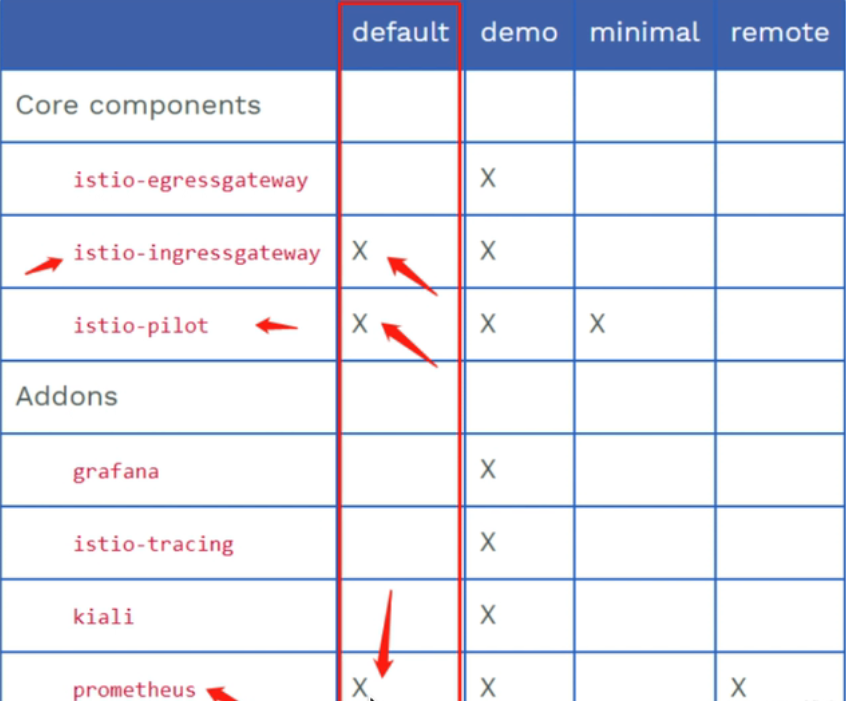
# istio# 安装1 2 3 4 5 6 7 8 9 10 11 12 13 14 15 16 17 18 19 20 21 22 23 24 25 26 27 28 29 30 31 32 33 34 35 36 37 38 39 40 41 42 43 44 45 46 47 48 49 50 51 52 53 54 55 56 57 58 59 60 61 62 63 64 65 66 67 68 69 70 71 72 73 74 75 76 77 // 安装istio命令行工具 curl -L https://istio.io/downloadIstio | sh - vim /etc/profile PATH=$PATH:/root/istio/bin source /etc/profile [root@iZuf60im9c63xjnpkubjq7Z istio-1.20.1]# cp tools/istioctl.bash ~/.istioctl.bash [root@iZuf60im9c63xjnpkubjq7Z istio-1.20.1]# source ~/.istioctl.bash [root@iZuf60im9c63xjnpkubjq7Z istio-1.20.1]# ls bin LICENSE manifests manifest.yaml README.md samples tools [root@iZuf60im9c63xjnpkubjq7Z istio-1.20.1]# istioctl version client version: 1.20.1 control plane version: 1.20.1 data plane version: 1.20.1 (8 proxies) // 安装istio istioctl manifest apply --set profile=demo [root@iZuf60im9c63xjnpkubjq7Z istio-1.20.1]# istioctl profile list Istio configuration profiles: ambient default demo empty external minimal openshift preview remote [root@iZuf60im9c63xjnpkubjq7Z istio-1.20.1]# kubectl get all -n istio-system NAME READY STATUS RESTARTS AGE pod/grafana-8cb9f8f79-9fr74 1/1 Running 0 28h pod/istio-egressgateway-8649fd8848-9hvp4 1/1 Running 0 2d6h pod/istio-ingressgateway-9b58f8c86-hk4fx 1/1 Running 0 2d6h pod/istiod-755784476f-lxnw2 1/1 Running 0 2d6h pod/jaeger-7cc9dd4499-hwsd9 1/1 Running 0 28h pod/kiali-6d5f569c67-s222f 1/1 Running 0 28h pod/prometheus-85674d4cb8-rqnlc 2/2 Running 0 28h NAME TYPE CLUSTER-IP EXTERNAL-IP PORT(S) AGE service/grafana ClusterIP 192.168.57.247 <none> 3000/TCP service/istio-egressgateway ClusterIP 192.168.74.170 <none> 80/TCP,443/TCP service/istio-ingressgateway LoadBalancer 192.168.126.220 101.132.74.102 15021:30190/TCP,80:30304/TCP,443:31928/TCP,31400:31218/TCP,15443:30438/TCP 2d6h service/istiod ClusterIP 192.168.72.13 <none> 15010/TCP,15012/TCP,443/TCP,15014/TCP service/jaeger-collector ClusterIP 192.168.94.27 <none> 14268/TCP,14250/TCP,9411/TCP,4317/TCP,4318/TCP service/kiali ClusterIP 192.168.80.120 <none> 20001/TCP,9090/TCP service/loki-headless ClusterIP None <none> 3100/TCP service/prometheus ClusterIP 192.168.226.115 <none> 9090/TCP service/tracing ClusterIP 192.168.218.160 <none> 80/TCP,16685/TCP service/zipkin ClusterIP 192.168.16.18 <none> 9411/TCP NAME READY UP-TO-DATE AVAILABLE AGE deployment.apps/grafana 1/1 1 1 28h deployment.apps/istio-egressgateway 1/1 1 1 2d6h deployment.apps/istio-ingressgateway 1/1 1 1 2d6h deployment.apps/istiod 1/1 1 1 2d6h deployment.apps/jaeger 1/1 1 1 28h deployment.apps/kiali 1/1 1 1 28h deployment.apps/prometheus 1/1 1 1 28h NAME DESIRED CURRENT READY AGE replicaset.apps/grafana-8cb9f8f79 1 1 1 28h replicaset.apps/istio-egressgateway-8649fd8848 1 1 1 2d6h replicaset.apps/istio-ingressgateway-9b58f8c86 1 1 1 2d6h replicaset.apps/istiod-755784476f 1 1 1 2d6h replicaset.apps/jaeger-7cc9dd4499 1 1 1 28h replicaset.apps/kiali-6d5f569c67 1 1 1 28h replicaset.apps/prometheus-85674d4cb8 1 1 1 28h // 卸载demo istioctl manifest generate --set profile=demo | kubectl delete -f -
1 2 3 4 5 6 7 8 9 10 11 12 13 14 [root@iZuf60im9c63xjnpkubjq7Z istio-1.20.1]# istioctl version client version: 1.20.1 control plane version: 1.20.1 data plane version: 1.20.1 (8 proxies) [root@iZuf60im9c63xjnpkubjq7Z istio-1.20.1]# istioctl analyze -n default ✔ No validation issues found when analyzing namespace: default. # 操作profile istioctl profile list istioctl profile dump demo > 1.yaml
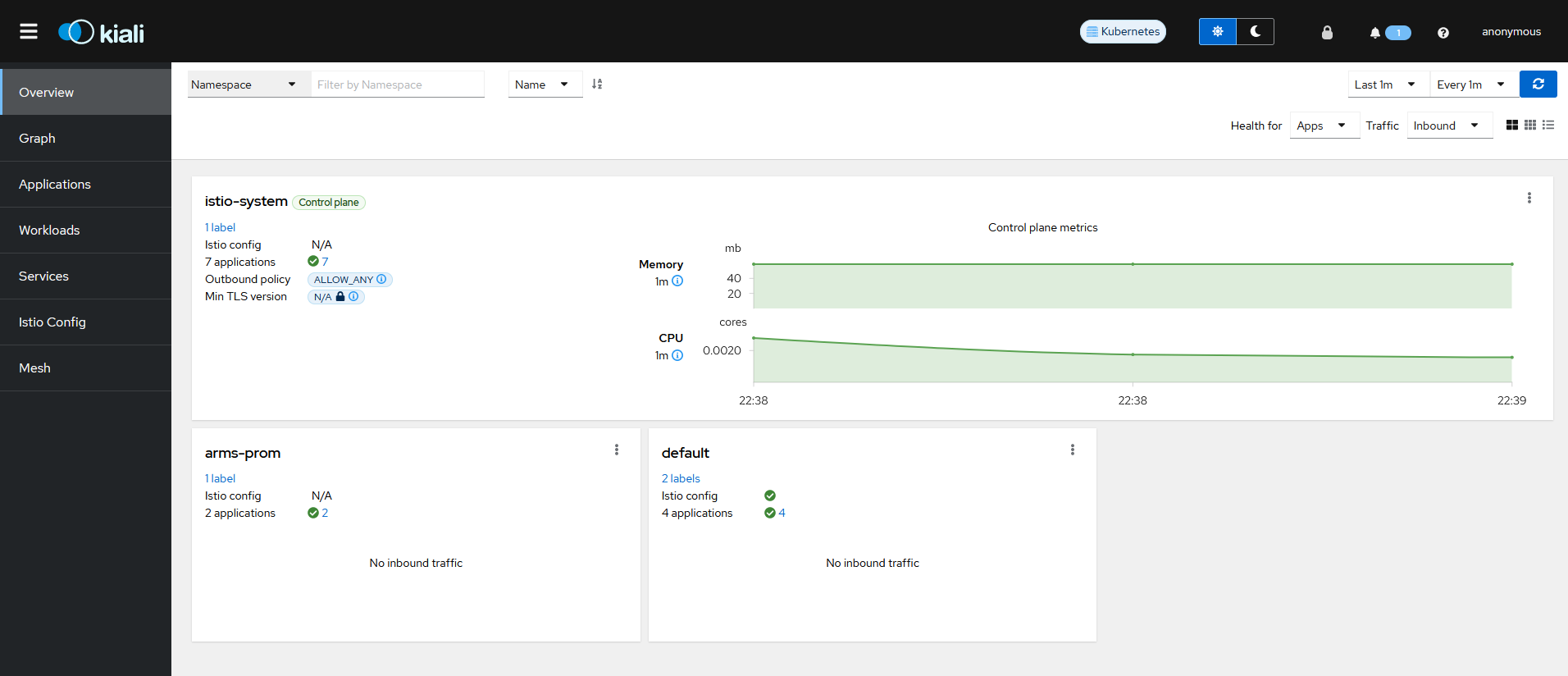
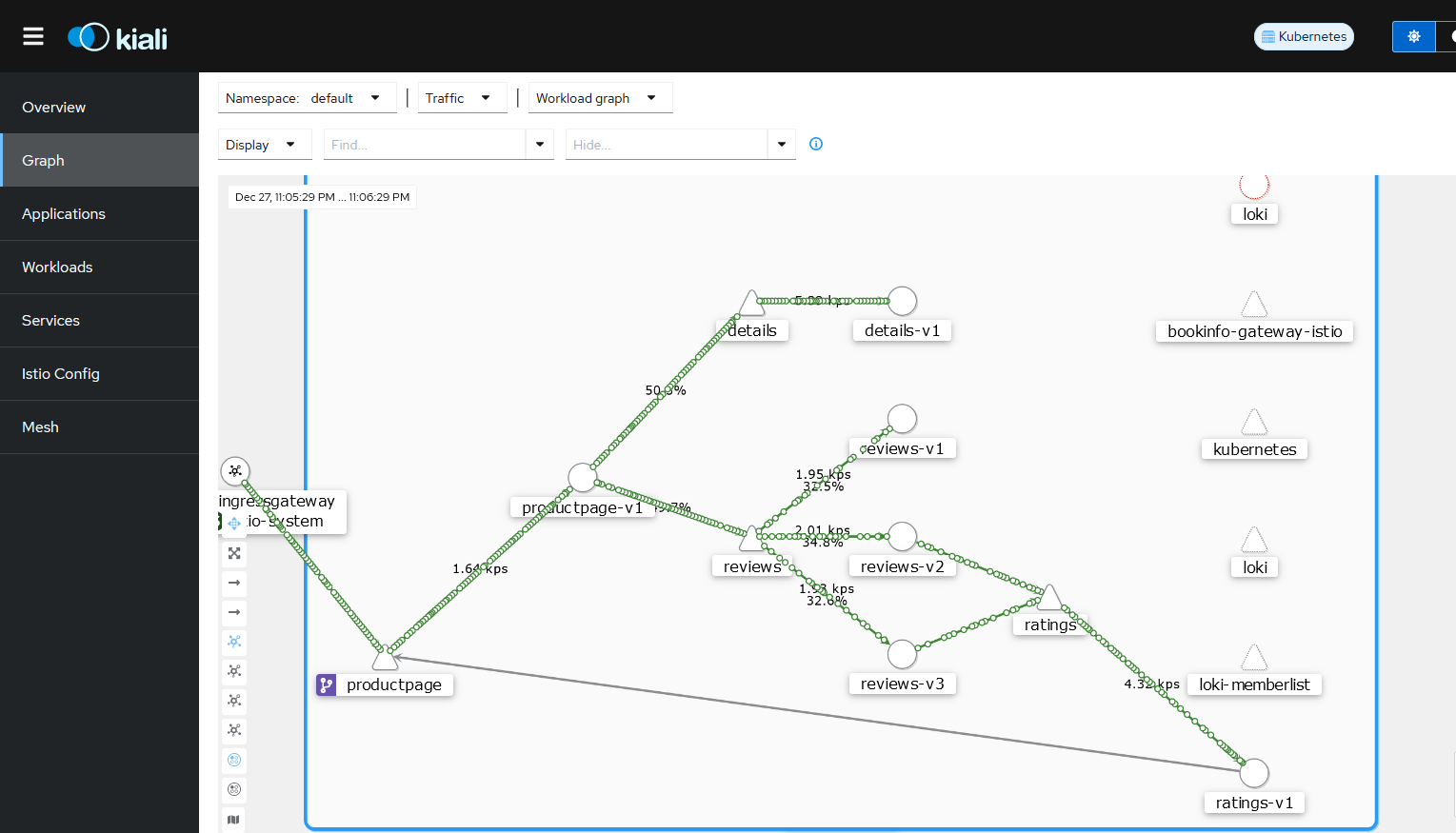
kiali
在部署 demo 这个 profile 之后,默认就会有这个 pod 和 svc,把 svc 改成 nodeport,访问 http://ip:Port
# injectistio 注入
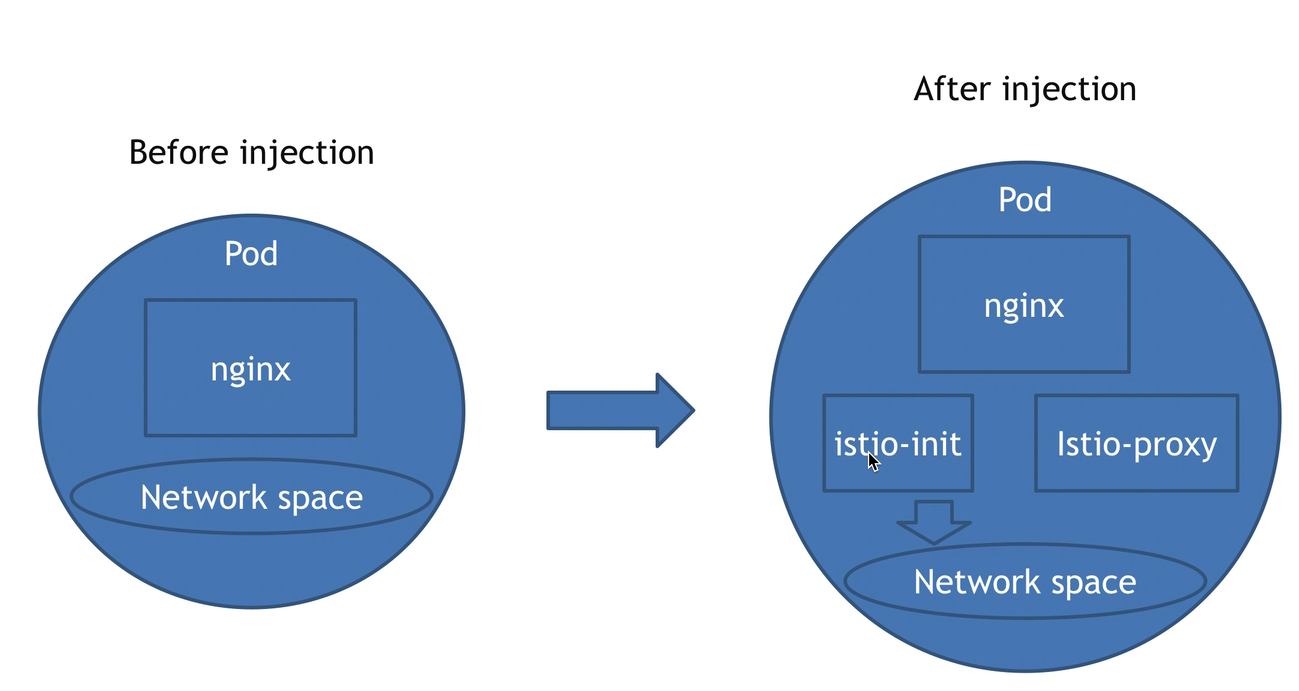
注入后在 pod 内生成 Net 和 Window
service,secret,configmap 被注入后不会多出容器
注入时新生成一个被注入的资源,在杀掉原来的资源
1 2 3 4 5 6 7 8 9 10 11 12 13 14 15 16 17 18 19 20 21 // 部署一个deployment,创建nginx apiVersion: apps/v1 kind: Deployment metadata: name: nginx-deployment spec: replicas: 3 selector: matchLabels: app: nginx template: metadata: labels: app: nginx spec: containers: - name: nginx image: nginx:latest ports: - containerPort: 80
1 istioctl kube-inject -f 111.yaml | kubectl apply -f -
1 2 3 4 5 6 7 8 9 10 11 12 13 14 15 16 17 18 19 20 21 22 23 24 25 26 27 28 29 30 31 32 33 34 35 36 37 38 39 40 41 42 43 44 45 46 47 48 49 50 51 52 53 54 55 56 57 58 59 60 61 62 63 64 65 66 67 68 69 70 71 72 73 74 75 76 77 78 79 80 81 82 83 84 85 86 87 88 89 90 91 92 93 94 95 96 97 98 99 100 101 102 103 104 105 106 107 108 109 110 111 112 113 114 115 116 117 118 119 120 121 122 123 124 125 126 127 128 129 130 131 132 133 134 135 136 137 138 139 140 141 142 143 144 145 146 147 148 149 150 151 152 153 154 155 156 157 158 159 160 161 162 163 164 165 166 167 168 169 170 171 172 173 174 175 176 177 178 179 180 181 182 183 184 185 186 187 188 189 190 191 192 193 194 195 196 197 198 199 200 201 202 203 204 205 206 207 208 209 210 211 212 213 214 215 216 217 218 219 220 221 222 223 224 225 226 227 228 229 230 231 232 233 234 [root@iZuf60im9c63xjnpkubjq7Z inject ] apiVersion: apps/v1 kind: Deployment metadata: creationTimestamp: null name: nginx-deployment spec: replicas: 1 selector: matchLabels: app: nginx strategy: {} template: metadata: annotations: istio.io/rev: default kubectl.kubernetes.io/default-container: nginx kubectl.kubernetes.io/default-logs-container: nginx prometheus.io/path: /stats/prometheus prometheus.io/port: "15020" prometheus.io/scrape: "true" sidecar.istio.io/status: '{"initContainers":["istio-init"],"containers":["istio-proxy"],"volumes":["workload-socket","credential-socket","workload-certs","istio-envoy","istio-data","istio-podinfo","istio-token","istiod-ca-cert"],"imagePullSecrets":null,"revision":"default"}' creationTimestamp: null labels: app: nginx security.istio.io/tlsMode: istio service.istio.io/canonical-name: nginx service.istio.io/canonical-revision: latest spec: containers: - image: nginx:latest name: nginx ports: - containerPort: 80 resources: {} - args: - proxy - sidecar - --domain - $(POD_NAMESPACE).svc.cluster.local - --proxyLogLevel=warning - --proxyComponentLogLevel=misc:error - --log_output_level=default:info env: - name: JWT_POLICY value: third-party-jwt - name: PILOT_CERT_PROVIDER value: istiod - name: CA_ADDR value: istiod.istio-system.svc:15012 - name: POD_NAME valueFrom: fieldRef: fieldPath: metadata.name - name: POD_NAMESPACE valueFrom: fieldRef: fieldPath: metadata.namespace - name: INSTANCE_IP valueFrom: fieldRef: fieldPath: status.podIP - name: SERVICE_ACCOUNT valueFrom: fieldRef: fieldPath: spec.serviceAccountName - name: HOST_IP valueFrom: fieldRef: fieldPath: status.hostIP - name: ISTIO_CPU_LIMIT valueFrom: resourceFieldRef: divisor: "0" resource: limits.cpu - name: PROXY_CONFIG value: | {} - name: ISTIO_META_POD_PORTS value: |- [ {"containerPort":80} ] - name: ISTIO_META_APP_CONTAINERS value: nginx - name: GOMEMLIMIT valueFrom: resourceFieldRef: divisor: "0" resource: limits.memory - name: GOMAXPROCS valueFrom: resourceFieldRef: divisor: "0" resource: limits.cpu - name: ISTIO_META_CLUSTER_ID value: Kubernetes - name: ISTIO_META_NODE_NAME valueFrom: fieldRef: fieldPath: spec.nodeName - name: ISTIO_META_INTERCEPTION_MODE value: REDIRECT - name: ISTIO_META_MESH_ID value: cluster.local - name: TRUST_DOMAIN value: cluster.local image: docker.io/istio/proxyv2:1.20.1 name: istio-proxy ports: - containerPort: 15090 name: http-envoy-prom protocol: TCP readinessProbe: failureThreshold: 4 httpGet: path: /healthz/ready port: 15021 periodSeconds: 15 timeoutSeconds: 3 resources: limits: cpu: "2" memory: 1Gi requests: cpu: 10m memory: 40Mi securityContext: allowPrivilegeEscalation: false capabilities: drop: - ALL privileged: false readOnlyRootFilesystem: true runAsGroup: 1337 runAsNonRoot: true runAsUser: 1337 startupProbe: failureThreshold: 600 httpGet: path: /healthz/ready port: 15021 periodSeconds: 1 timeoutSeconds: 3 volumeMounts: - mountPath: /var/run/secrets/workload-spiffe-uds name: workload-socket - mountPath: /var/run/secrets/credential-uds name: credential-socket - mountPath: /var/run/secrets/workload-spiffe-credentials name: workload-certs - mountPath: /var/run/secrets/istio name: istiod-ca-cert - mountPath: /var/lib/istio/data name: istio-data - mountPath: /etc/istio/proxy name: istio-envoy - mountPath: /var/run/secrets/tokens name: istio-token - mountPath: /etc/istio/pod name: istio-podinfo initContainers: - args: - istio-iptables - -p - "15001" - -z - "15006" - -u - "1337" - -m - REDIRECT - -i - '*' - -x - "" - -b - '*' - -d - 15090 ,15021,15020 - --log_output_level=default:info image: docker.io/istio/proxyv2:1.20.1 name: istio-init resources: limits: cpu: "2" memory: 1Gi requests: cpu: 10m memory: 40Mi securityContext: allowPrivilegeEscalation: false capabilities: add: - NET_ADMIN - NET_RAW drop: - ALL privileged: false readOnlyRootFilesystem: false runAsGroup: 0 runAsNonRoot: false runAsUser: 0 volumes: - name: workload-socket - name: credential-socket - name: workload-certs - emptyDir: medium: Memory name: istio-envoy - emptyDir: {} name: istio-data - downwardAPI: items: - fieldRef: fieldPath: metadata.labels path: labels - fieldRef: fieldPath: metadata.annotations path: annotations name: istio-podinfo - name: istio-token projected: sources: - serviceAccountToken: audience: istio-ca expirationSeconds: 43200 path: istio-token - configMap: name: istio-ca-root-cert name: istiod-ca-cert status: {}---
istio-init 初始化网络命名空间
注入后所有的容器都在同一个 ns 中
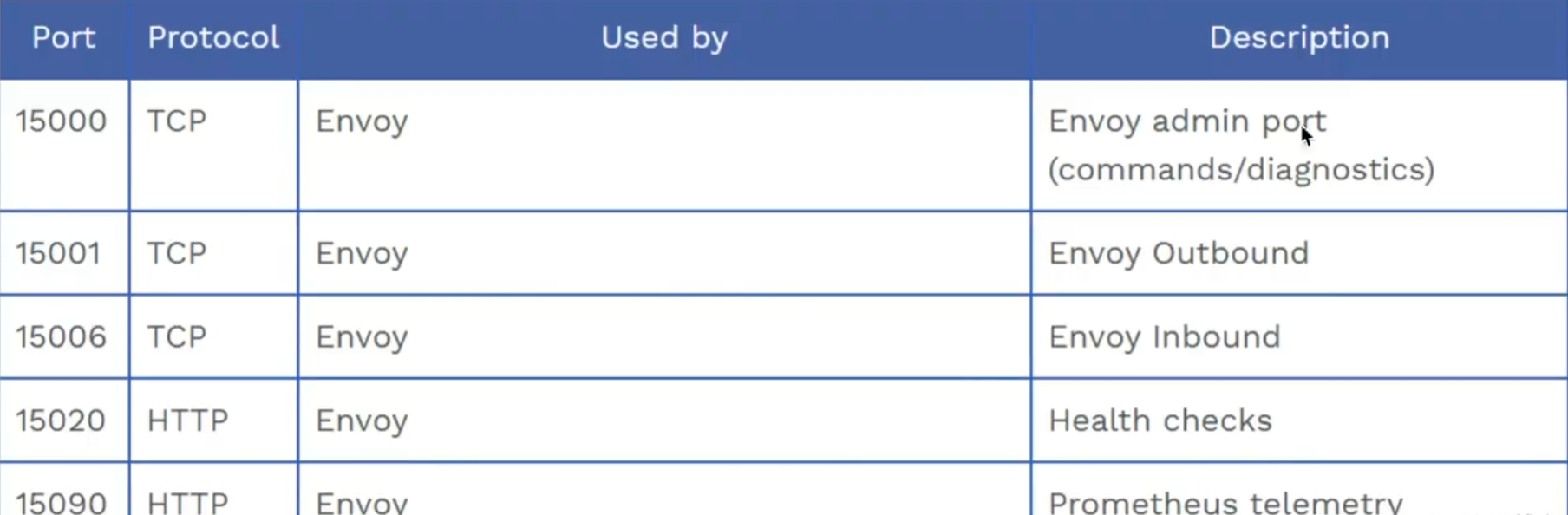
1 2 3 4 5 6 7 8 9 10 11 12 13 14 15 16 17 18 19 20 21 22 23 24 25 26 [root@iZuf60im9c63xjnpkubjq7Z inject]# kubectl exec -it nginx-deployment-846d79d-77zhs -c nginx -- bash root@nginx-deployment-846d79d-77zhs:/# hostname -i 2408:4002:1038:9800:dea9:b421:34bb:25a0 10.0.0.240 [root@iZuf60im9c63xjnpkubjq7Z inject]# kubectl exec -it nginx-deployment-846d79d-77zhs -c istio-proxy -- bash istio-proxy@nginx-deployment-846d79d-77zhs:/$ hostname -i 2408:4002:1038:9800:dea9:b421:34bb:25a0 10.0.0.240 [root@iZuf60im9c63xjnpkubjq7Z inject]# kubectl exec -it nginx-deployment-846d79d-77zhs -c istio-proxy -- bash istio-proxy@nginx-deployment-846d79d-77zhs:/$ netstat -lntup Active Internet connections (only servers) Proto Recv-Q Send-Q Local Address Foreign Address State PID/Program name tcp 0 0 0.0.0.0:15021 0.0.0.0:* LISTEN 14/envoy tcp 0 0 0.0.0.0:15021 0.0.0.0:* LISTEN 14/envoy tcp 0 0 0.0.0.0:80 0.0.0.0:* LISTEN - tcp 0 0 0.0.0.0:15090 0.0.0.0:* LISTEN 14/envoy tcp 0 0 0.0.0.0:15090 0.0.0.0:* LISTEN 14/envoy tcp 0 0 127.0.0.1:15000 0.0.0.0:* LISTEN 14/envoy tcp 0 0 0.0.0.0:15001 0.0.0.0:* LISTEN 14/envoy tcp 0 0 0.0.0.0:15001 0.0.0.0:* LISTEN 14/envoy tcp 0 0 127.0.0.1:15004 0.0.0.0:* LISTEN 1/pilot-agent tcp 0 0 0.0.0.0:15006 0.0.0.0:* LISTEN 14/envoy tcp 0 0 0.0.0.0:15006 0.0.0.0:* LISTEN 14/envoy tcp6 0 0 :::15020 :::* LISTEN 1/pilot-agent tcp6 0 0 :::80 :::* LISTEN -
1 2 3 4 5 6 7 8 9 10 11 12 13 14 15 16 17 18 19 20 21 22 23 24 25 26 27 28 29 30 31 32 33 34 35 36 37 38 39 40 41 42 43 44 45 46 47 48 49 50 51 52 53 54 55 56 57 58 59 60 61 62 63 64 65 66 67 68 69 70 71 72 73 74 75 76 77 78 79 80 81 82 83 84 85 86 87 88 89 90 91 92 93 94 95 96 97 98 99 100 101 102 103 104 105 106 107 108 109 110 111 112 113 114 115 116 117 118 119 120 121 122 123 124 125 126 127 [root@iZuf60im9c63xjnpkubjq7Z inject]# kubectl logs -f nginx-deployment-846d79d-77zhs -c istio-init 2023-12-28T09:08:49.813711Z info Istio iptables environment: ENVOY_PORT= INBOUND_CAPTURE_PORT= ISTIO_INBOUND_INTERCEPTION_MODE= ISTIO_INBOUND_TPROXY_ROUTE_TABLE= ISTIO_INBOUND_PORTS= ISTIO_OUTBOUND_PORTS= ISTIO_LOCAL_EXCLUDE_PORTS= ISTIO_EXCLUDE_INTERFACES= ISTIO_SERVICE_CIDR= ISTIO_SERVICE_EXCLUDE_CIDR= ISTIO_META_DNS_CAPTURE= INVALID_DROP= 2023-12-28T09:08:49.813747Z info Istio iptables variables: IPTABLES_VERSION= PROXY_PORT=15001 PROXY_INBOUND_CAPTURE_PORT=15006 PROXY_TUNNEL_PORT=15008 PROXY_UID=1337 PROXY_GID=1337 INBOUND_INTERCEPTION_MODE=REDIRECT INBOUND_TPROXY_MARK=1337 INBOUND_TPROXY_ROUTE_TABLE=133 INBOUND_PORTS_INCLUDE=* INBOUND_PORTS_EXCLUDE=15090,15021,15020 OUTBOUND_OWNER_GROUPS_INCLUDE=* OUTBOUND_OWNER_GROUPS_EXCLUDE= OUTBOUND_IP_RANGES_INCLUDE=* OUTBOUND_IP_RANGES_EXCLUDE= OUTBOUND_PORTS_INCLUDE= OUTBOUND_PORTS_EXCLUDE= KUBE_VIRT_INTERFACES= ENABLE_INBOUND_IPV6=false DUAL_STACK=false DNS_CAPTURE=false DROP_INVALID=false CAPTURE_ALL_DNS=false DNS_SERVERS=[],[] NETWORK_NAMESPACE= CNI_MODE=false EXCLUDE_INTERFACES= 2023-12-28T09:08:49.813791Z info Running iptables-restore with the following input: * nat -N ISTIO_INBOUND // iptables增加链 -N ISTIO_REDIRECT -N ISTIO_IN_REDIRECT -N ISTIO_OUTPUT -A ISTIO_INBOUND -p tcp --dport 15008 -j RETURN -A ISTIO_REDIRECT -p tcp -j REDIRECT --to-ports 15001 -A ISTIO_IN_REDIRECT -p tcp -j REDIRECT --to-ports 15006 -A PREROUTING -p tcp -j ISTIO_INBOUND -A ISTIO_INBOUND -p tcp --dport 15090 -j RETURN -A ISTIO_INBOUND -p tcp --dport 15021 -j RETURN -A ISTIO_INBOUND -p tcp --dport 15020 -j RETURN -A ISTIO_INBOUND -p tcp -j ISTIO_IN_REDIRECT -A OUTPUT -p tcp -j ISTIO_OUTPUT -A ISTIO_OUTPUT -o lo -s 127.0.0.6/32 -j RETURN -A ISTIO_OUTPUT -o lo ! -d 127.0.0.1/32 -p tcp ! --dport 15008 -m owner --uid-owner 1337 -j ISTIO_IN_REDIRECT -A ISTIO_OUTPUT -o lo -m owner ! --uid-owner 1337 -j RETURN -A ISTIO_OUTPUT -m owner --uid-owner 1337 -j RETURN -A ISTIO_OUTPUT -o lo ! -d 127.0.0.1/32 -p tcp ! --dport 15008 -m owner --gid-owner 1337 -j ISTIO_IN_REDIRECT -A ISTIO_OUTPUT -o lo -m owner ! --gid-owner 1337 -j RETURN -A ISTIO_OUTPUT -m owner --gid-owner 1337 -j RETURN -A ISTIO_OUTPUT -d 127.0.0.1/32 -j RETURN -A ISTIO_OUTPUT -j ISTIO_REDIRECT COMMIT 2023-12-28T09:08:49.813839Z info Running command (with wait lock): iptables-restore --noflush --wait=30 2023-12-28T09:08:49.815293Z info Running ip6tables-restore with the following input: 2023-12-28T09:08:49.815329Z info Running command (with wait lock): ip6tables-restore --noflush --wait=30 2023-12-28T09:08:49.816025Z info Running command (without lock): iptables-save 2023-12-28T09:08:49.817187Z info Command output: # Generated by iptables-save v1.8.7 on Thu Dec 28 09:08:49 2023 *raw :PREROUTING ACCEPT [0:0] :OUTPUT ACCEPT [0:0] COMMIT # Completed on Thu Dec 28 09:08:49 2023 # Generated by iptables-save v1.8.7 on Thu Dec 28 09:08:49 2023 *mangle :PREROUTING ACCEPT [0:0] :INPUT ACCEPT [0:0] :FORWARD ACCEPT [0:0] :OUTPUT ACCEPT [0:0] :POSTROUTING ACCEPT [0:0] COMMIT # Completed on Thu Dec 28 09:08:49 2023 # Generated by iptables-save v1.8.7 on Thu Dec 28 09:08:49 2023 *filter :INPUT ACCEPT [0:0] :FORWARD ACCEPT [0:0] :OUTPUT ACCEPT [0:0] COMMIT # Completed on Thu Dec 28 09:08:49 2023 # Generated by iptables-save v1.8.7 on Thu Dec 28 09:08:49 2023 *nat :PREROUTING ACCEPT [0:0] :INPUT ACCEPT [0:0] :OUTPUT ACCEPT [0:0] :POSTROUTING ACCEPT [0:0] :ISTIO_INBOUND - [0:0] :ISTIO_IN_REDIRECT - [0:0] :ISTIO_OUTPUT - [0:0] :ISTIO_REDIRECT - [0:0] -A PREROUTING -p tcp -j ISTIO_INBOUND -A OUTPUT -p tcp -j ISTIO_OUTPUT -A ISTIO_INBOUND -p tcp -m tcp --dport 15008 -j RETURN -A ISTIO_INBOUND -p tcp -m tcp --dport 15090 -j RETURN -A ISTIO_INBOUND -p tcp -m tcp --dport 15021 -j RETURN -A ISTIO_INBOUND -p tcp -m tcp --dport 15020 -j RETURN -A ISTIO_INBOUND -p tcp -j ISTIO_IN_REDIRECT -A ISTIO_IN_REDIRECT -p tcp -j REDIRECT --to-ports 15006 -A ISTIO_OUTPUT -s 127.0.0.6/32 -o lo -j RETURN -A ISTIO_OUTPUT ! -d 127.0.0.1/32 -o lo -p tcp -m tcp ! --dport 15008 -m owner --uid-owner 1337 -j ISTIO_IN_REDIRECT -A ISTIO_OUTPUT -o lo -m owner ! --uid-owner 1337 -j RETURN -A ISTIO_OUTPUT -m owner --uid-owner 1337 -j RETURN -A ISTIO_OUTPUT ! -d 127.0.0.1/32 -o lo -p tcp -m tcp ! --dport 15008 -m owner --gid-owner 1337 -j ISTIO_IN_REDIRECT -A ISTIO_OUTPUT -o lo -m owner ! --gid-owner 1337 -j RETURN -A ISTIO_OUTPUT -m owner --gid-owner 1337 -j RETURN -A ISTIO_OUTPUT -d 127.0.0.1/32 -j RETURN -A ISTIO_OUTPUT -j ISTIO_REDIRECT -A ISTIO_REDIRECT -p tcp -j REDIRECT --to-ports 15001 COMMIT # Completed on Thu Dec 28 09:08:49 2023
1
2
3
4
5
6
7
8
9
10
11
12
13
14
15
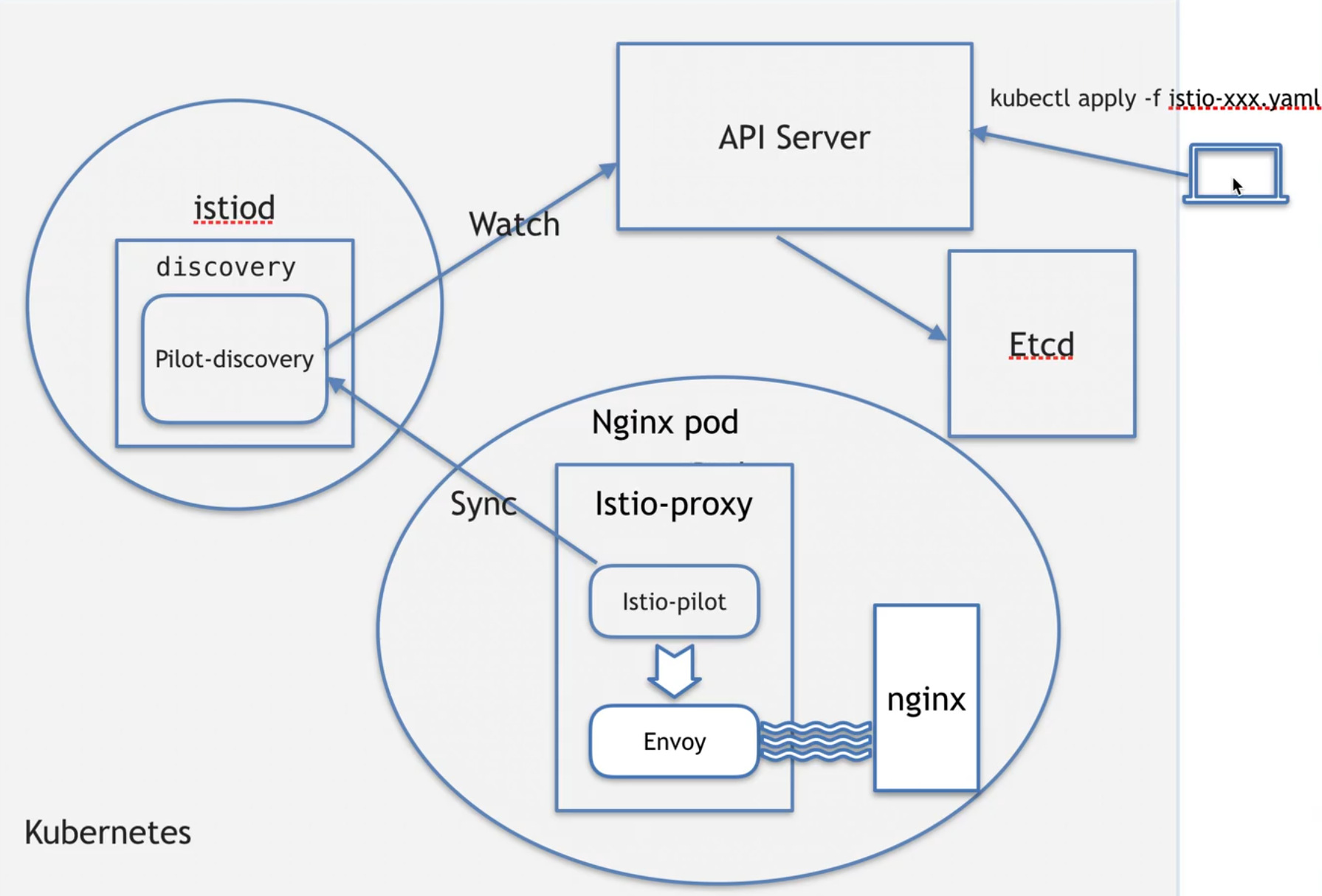
被注入后,会有istio-proxy中会有两个进程 istio-proxy@nginx-deployment-846d79d-77zhs:/$ ps -ef UID PID PPID C STIME TTY TIME CMD istio-p+ 1 0 0 Dec28 ? 00:00:35 /usr/local/bin/pilot-agent proxy sidecar --domain default.svc.cluster.local --proxyLogLevel=warning --proxyComponentLogLevel=misc:error --log_output_level=default:info istio-p+ 14 1 0 Dec28 ? 00:02:19 /usr/local/bin/envoy -c etc/istio/proxy/envoy-rev.json --drain-time-s 45 --drain-strategy immediate --local-address-ip-version v4 --file-flush-interval-msec 1000 --disable-hot-restart --allow-unknown-static-fields --log- istio-p+ 58 0 0 05:45 pts/0 00:00:00 bash istio-p+ 67 58 0 05:45 pts/0 00:00:00 ps -ef pilot-agent动作: 1生成envoy,启动配置 2启动envoy 3监控并管理envoy 的运行情况,比如envoy出错时负责重启,envoy 配置变更后重新加载 可以把envoy理解成一个轻量的ngx
1
2
3
4
5
istio-proxy@istiod-755784476f-lxnw2:/$ ps -ef UID PID PPID C STIME TTY TIME CMD istio-p+ 1 0 0 Dec25 ? 00:10:28 /usr/local/bin/pilot-discovery discovery --monitoringAddr=:15014 --log_output_level=default:info --domain cluster.local --keepaliveMaxServerConnectionAge 30m istio-p+ 20 0 0 11:30 pts/0 00:00:00 bash istio-p+ 28 20 0 11:30 pts/0 00:00:00 ps -ef
1
2
3
4
5
6
7
8
9
10
11
12
13
14
15
16
istio-proxy@nginx-deployment-846d79d-77zhs:/$ netstat -lntup Active Internet connections (only servers) Proto Recv-Q Send-Q Local Address Foreign Address State PID/Program name tcp 0 0 0.0.0.0:15021 0.0.0.0:* LISTEN 14/envoy tcp 0 0 0.0.0.0:15021 0.0.0.0:* LISTEN 14/envoy tcp 0 0 0.0.0.0:80 0.0.0.0:* LISTEN - tcp 0 0 0.0.0.0:15090 0.0.0.0:* LISTEN 14/envoy tcp 0 0 0.0.0.0:15090 0.0.0.0:* LISTEN 14/envoy tcp 0 0 127.0.0.1:15000 0.0.0.0:* LISTEN 14/envoy tcp 0 0 0.0.0.0:15001 0.0.0.0:* LISTEN 14/envoy tcp 0 0 0.0.0.0:15001 0.0.0.0:* LISTEN 14/envoy tcp 0 0 127.0.0.1:15004 0.0.0.0:* LISTEN 1/pilot-agent tcp 0 0 0.0.0.0:15006 0.0.0.0:* LISTEN 14/envoy tcp 0 0 0.0.0.0:15006 0.0.0.0:* LISTEN 14/envoy tcp6 0 0 :::15020 :::* LISTEN 1/pilot-agent tcp6 0 0 :::80 :::* LISTEN -
15000 只能本 network ns 才能访问,不允许外部流量访问
同样的镜像 proxyv2 产生了不同的行为
当用户同时在 kubernetes 中的 yaml 文件中写了 command 和 args 的时候自然是可以覆盖 DockerFile 中 ENTRYPOINT 的命令行和参数,完整的情况分类如下:
自动注入
本质是给 ns 打标签
kubectl label ns istio-injection=enabled
# upgrade1. 升级被注入的资源
2. 升级 istio
1
2
3
4
5
6
7
8
9
10
11
12
13
1.download istio 2.tar xzvf istio.tar.gz 3.source istio.bash 4.保证升级前后profile相同 istioctl profile dump demo > 1.demo 4.1修改jwt策略 5.upgrade istioctl upgrade -f 1.demo
https://istio.io/latest/zh/docs/setup/upgrade/in-place/
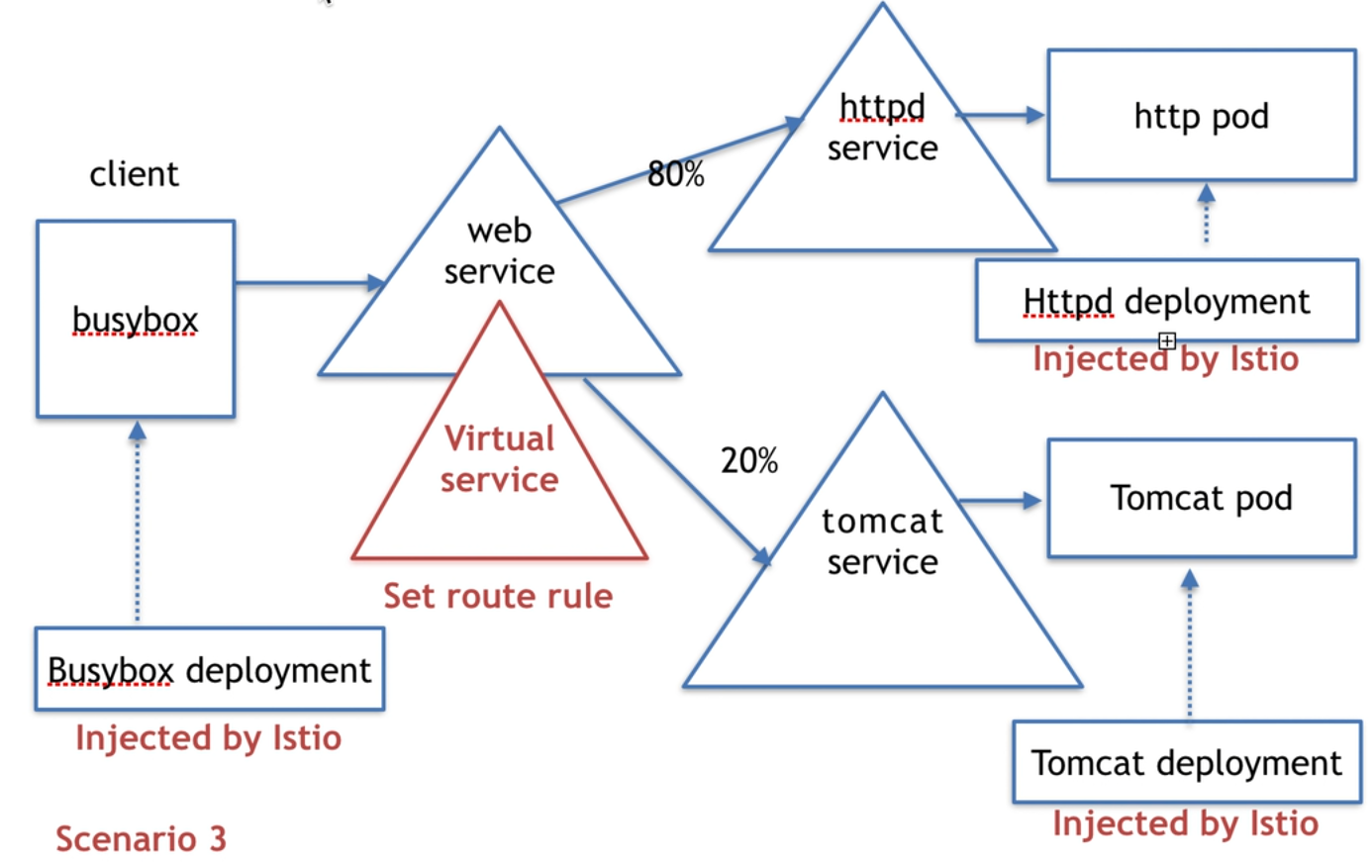
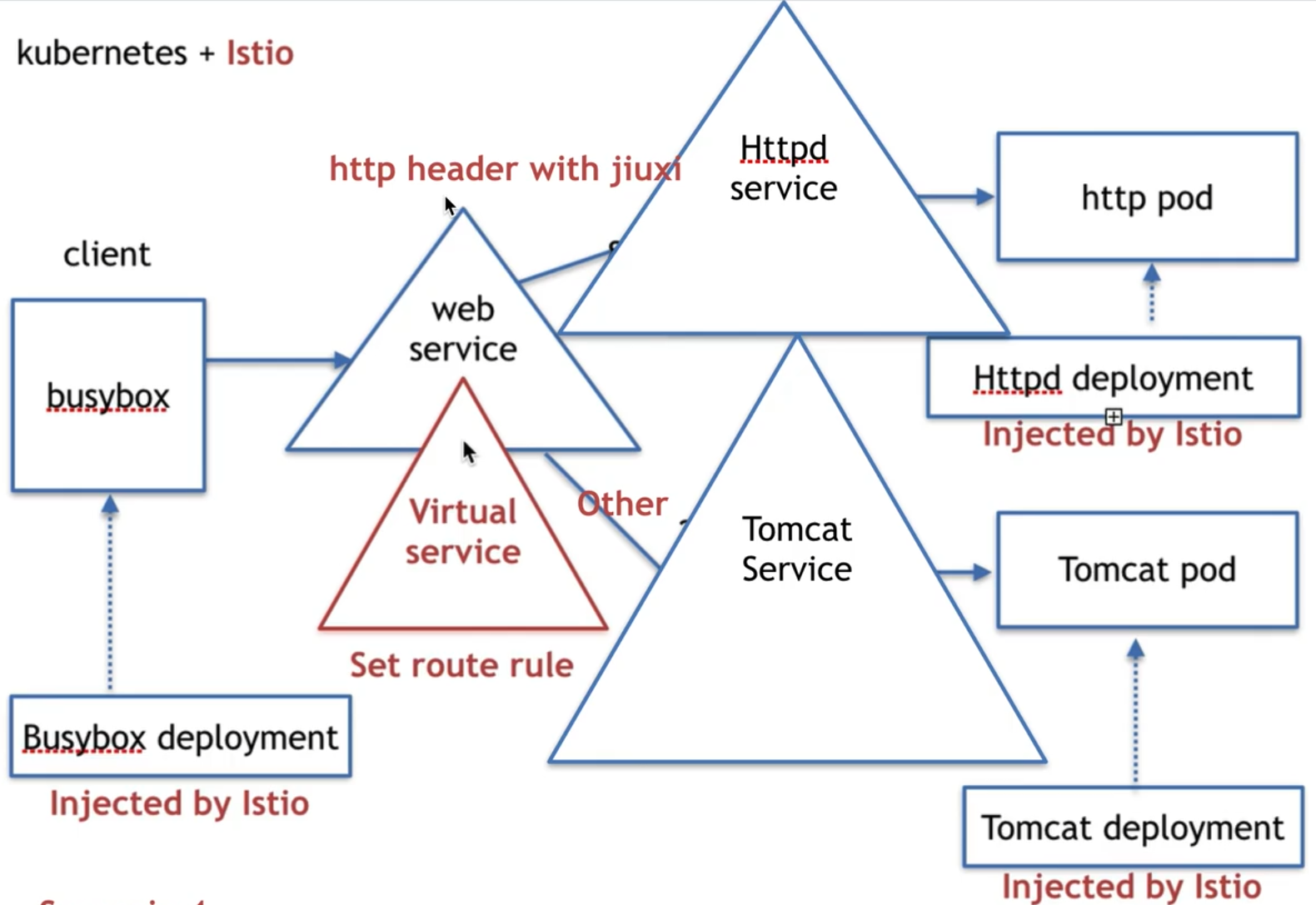
# virtual service一种实现流量管理的方式
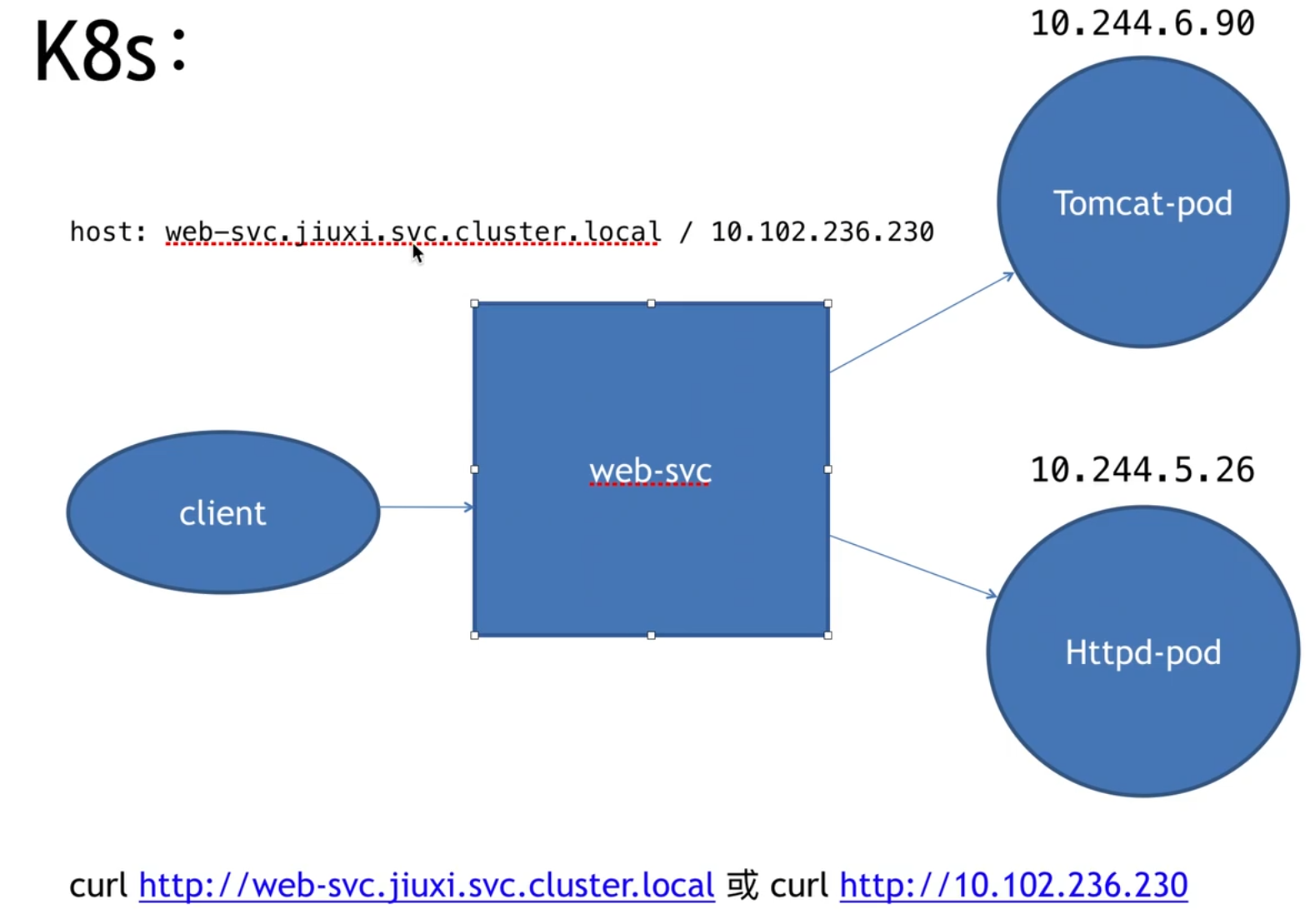
service 可以简单理解为一个微服务
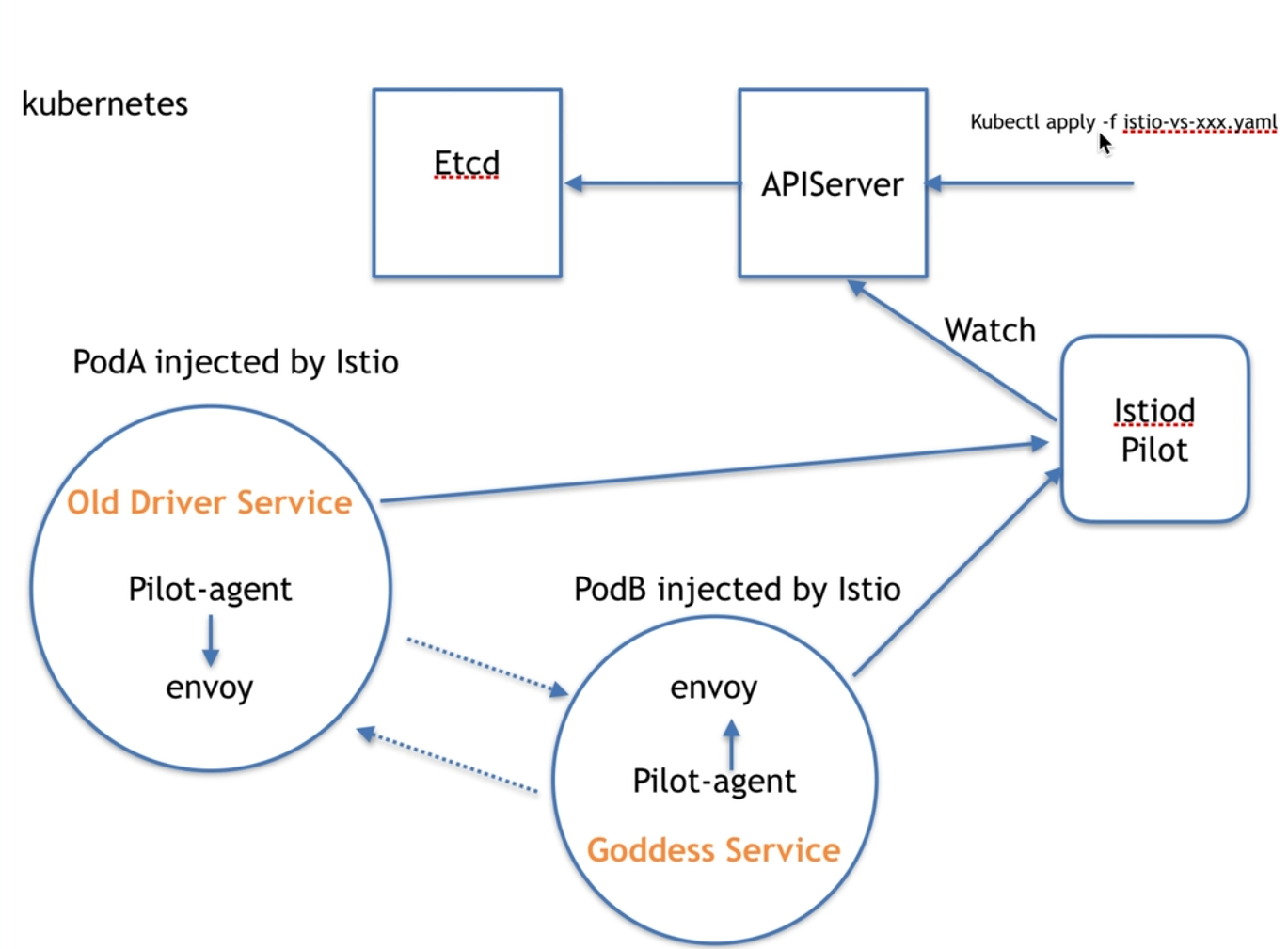
注入后的微服务,就会形成一个网格
网格之间的通信要通过网格的 proxy
ingress -> envoy -> service -> envoy ->envoyB -> serviceB -> envoyB -> engress
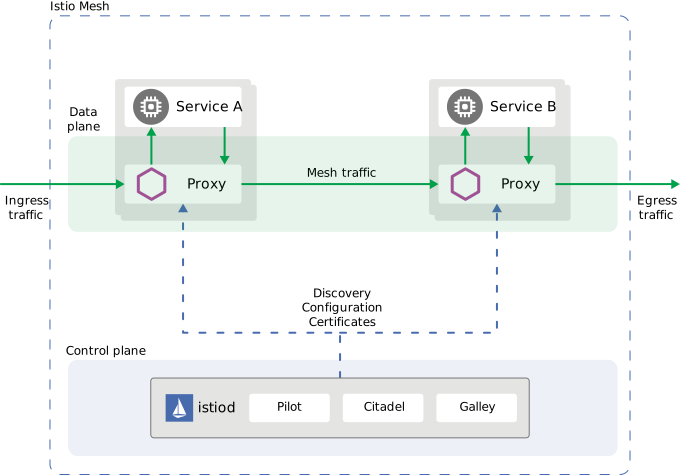
Istio 架构由数据面 (data plane) 和控制面 (control plane) 构成,因此 lstio 流量也可以分为数据面流量和控制面流量。数据面流量是指微服务之间业务调用的流量,控制面流量是指 Istio 各组件之间配置和控制网格行为的流量。
traffic management 指的是数据平面的流量
lstio traffic management model 依赖于随服务一起部署的 Envoy 代理,网格发送和接收的所有流量 (数据平面流量) 都通过 Envoy 进行代理。基于此模型可以轻松引导和控制网格周围的流量,而无需对服务进行任何更改
traffic management 实现方式
Virtual services
Destination rules
Gateways
Service entries
Sidecars
client 也需要被 istio 注入才能实现上述功能,他们必须在一个 istio 网络内
1
2
3
4
5
6
7
8
9
10
11
12
13
14
15
apiVersion: networking.istio.io/ kind: VirtualService metadata: name: web-svc spec: hosts: - web-svc.default.svc.cluster.local http: - route: - destination: host: tomcat-svc.default.svc.cluster.local weight: 80 - destination: host: httpd-svc.default.svc.cluster.local weight: 20
istio 规则只在集群内生效,从外部访问无效
kubectl get virtualservices.networking.istio.io
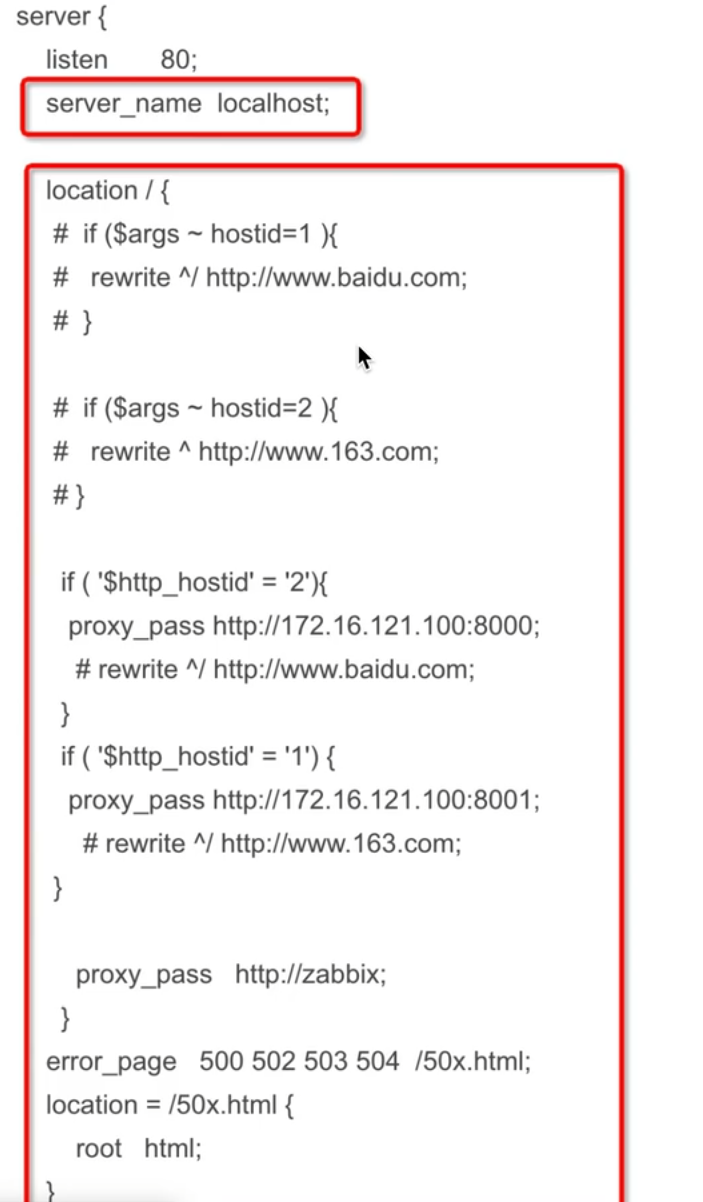
envoy 是个反代服务器
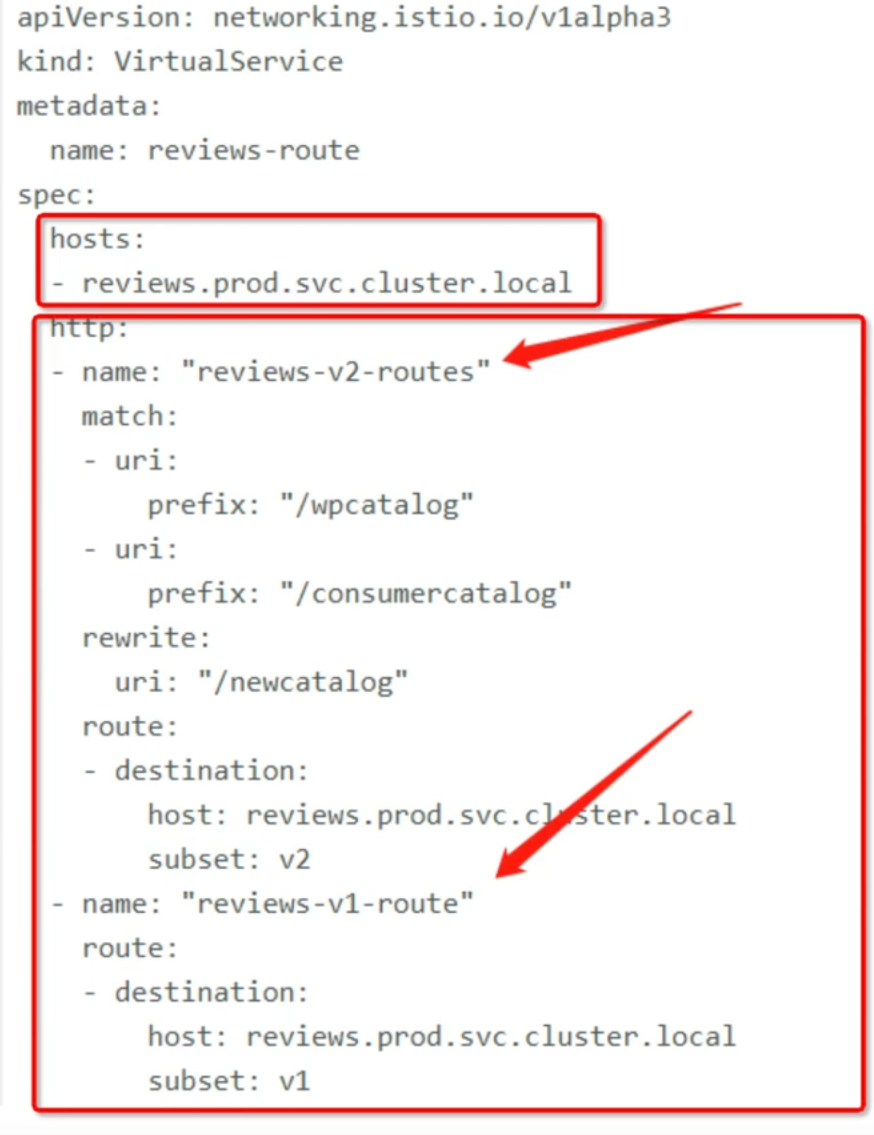
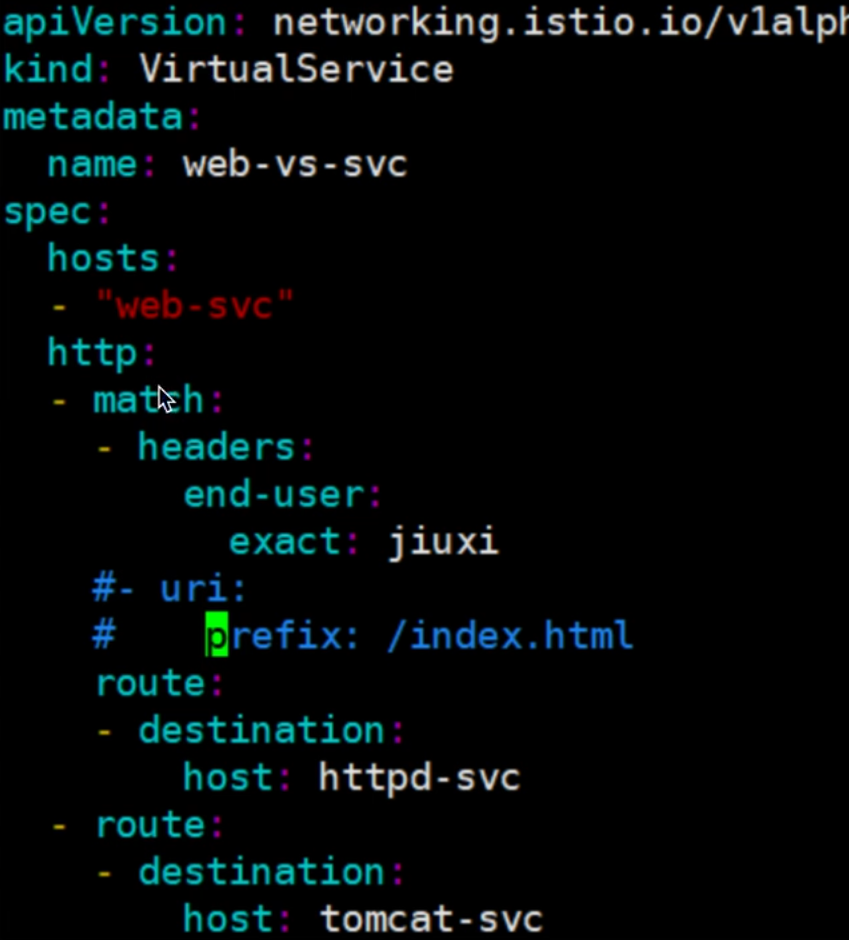
virtualservice 指向一个 host,host 可以在 k8s 内寻址,host 路由规则依据 routing rules
hosts field
1 short name service(web-svc
2 full qualified domain name service(web-svc.default.svc.clusterlocal
3 gateway name( www.web-svc.com )
4 *
rules
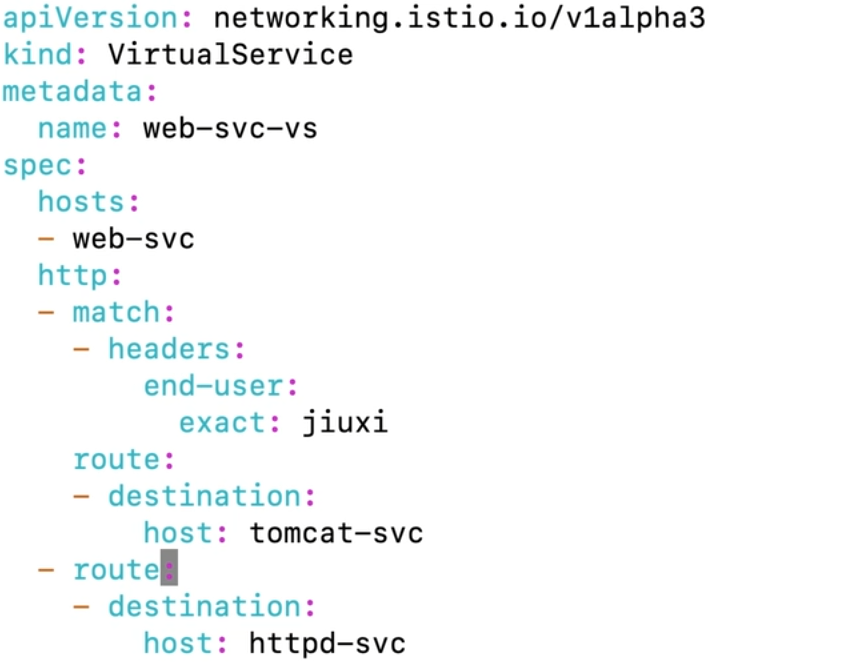
1.match condition
2.destination
路由优先级:在 yaml 中越往上优先级越高
wget -q -O - http://wev-svc-vs:8080 --header ‘end-user: jiuxi’
# 故障 注入为了测试微服务应用程序 Bookinfo 的弹性,我们将为用户 jason 在 reviews:v2 和 ratings 服务之间注入一个 7 秒的延迟。 这个测试将会发现一个故意引入 Bookinfo 应用程序中的 bug。
注意 reviews:v2 服务对 ratings 服务的调用具有 10 秒的硬编码连接超时。 因此,尽管引入了 7 秒的延迟,我们仍然期望端到端的流程是没有任何错误的。
创建故障注入规则以延迟来自测试用户 jason 的流量:
1
2
3
4
5
6
7
8
9
10
11
12
13
14
15
16
17
18
19
20
21
22
23
apiVersion: networking.istio.io/v1beta1 kind: VirtualService spec: hosts: - ratings http: - fault: delay: fixedDelay: 7s percentage: value: 100 match: - headers: end-user: exact: jason route: - destination: host: ratings subset: v1 - route: - destination: host: ratings subset: v1
按照预期,我们引入的 7 秒延迟不会影响到 reviews 服务,因为 reviews 和 ratings 服务间的超时被硬编码为 10 秒。 但是,在 productpage 和 reviews 服务之间也有一个 3 秒的硬编码的超时,再加 1 次重试,一共 6 秒。 结果, productpage 对 reviews 的调用在 6 秒后提前超时并抛出错误了。
测试微服务弹性的另一种方法是引入 HTTP abort 故障。 在这个任务中,针对测试用户 jason ,将给 ratings 微服务引入一个 HTTP abort。
在这种情况下,我们希望页面能够立即加载,同时显示 Ratings service is currently unavailable 这样的消息。
1
2
3
4
5
6
7
8
9
10
11
12
13
14
15
16
17
18
19
20
21
22
23
apiVersion: networking.istio.io/v1beta1 kind: VirtualService spec: hosts: - ratings http: - fault: abort: httpStatus: 500 percentage: value: 100 match: - headers: end-user: exact: jason route: - destination: host: ratings subset: v1 - route: - destination: host: ratings subset: v1
如果您注销用户 jason 或在匿名窗口(或其他浏览器)中打开 Bookinfo 应用程序, 您将看到 /productpage 为除 jason 以外的其他用户调用了 reviews:v1 (完全不调用 ratings )。 因此,您不会看到任何错误消息。
# 流量转移一个常见的用例是将 TCP 流量从微服务的旧版本逐步迁移到新版本。 在 Istio 中,您可以通过配置一系列路由规则来实现此目标,这些规则将一定比例的 TCP 流量从一个目的地重定向到另一个目的地。
在此任务中,您将会把 100% 的 TCP 流量分配到 tcp-echo:v1 。 接着,再通过配置 Istio 路由权重把 20% 的 TCP 流量分配到 tcp-echo:v2 。
1
2
3
4
5
6
7
8
9
10
11
12
13
14
15
16
17
18
19
20
21
apiVersion: networking.istio.io/v1beta1 kind: VirtualService ... spec: ... tcp: - match: - port: 31400 route: - destination: host: tcp-echo port: number: 9000 subset: v1 weight: 80 - destination: host: tcp-echo port: number: 9000 subset: v2 weight: 20
# 请求超时1 2 3 4 5 6 7 8 9 10 11 12 13 14 15 16 apiVersion: networking.istio.io/v1alpha3 kind: VirtualService metadata: name: ratings spec: hosts: - ratings http: - fault: delay: percent: 100 fixedDelay: 2s route: - destination: host: ratings subset: v1
这时可以看到 Bookinfo 应用运行正常(显示了评级的星型符号),但是每次刷新页面, 都会有 2 秒的延迟。
1 2 3 4 5 6 7 8 9 10 11 12 13 apiVersion: networking.istio.io/v1alpha3 kind: VirtualService metadata: name: reviews spec: hosts: - reviews http: - route: - destination: host: reviews subset: v2 timeout: 0.5s
这时候应该看到 1 秒钟就会返回,而不是之前的 2 秒钟,但 reviews 是不可用的。
即使超时配置为半秒,响应仍需要 1 秒,是因为 productpage 服务中存在硬编码重试, 因此它在返回之前调用 reviews 服务超时两次。
# 镜像流量1 2 3 4 5 6 7 8 9 10 11 12 13 14 15 16 17 18 19 20 21 22 23 24 25 26 27 apiVersion: networking.istio.io/v1alpha3 kind: VirtualService metadata: name: httpbin spec: hosts: - httpbin http: - route: - destination: host: httpbin subset: v1 weight: 100 --- apiVersion: networking.istio.io/v1alpha3 kind: DestinationRule metadata: name: httpbin spec: host: httpbin subsets: - name: v1 labels: version: v1 - name: v2 labels: version: v2
1 2 3 4 5 6 7 8 9 10 11 12 13 14 15 16 17 18 apiVersion: networking.istio.io/v1alpha3 kind: VirtualService metadata: name: httpbin spec: hosts: - httpbin http: - route: - destination: host: httpbin subset: v1 weight: 100 mirror: host: httpbin subset: v2 mirrorPercentage: value: 100.0
# DestinationRule# 熔断1 2 3 4 5 6 7 8 9 10 11 12 13 14 15 16 17 18 apiVersion: networking.istio.io/v1alpha3 kind: DestinationRule metadata: name: httpbin spec: host: httpbin trafficPolicy: connectionPool: tcp: maxConnections: 1 http: http1MaxPendingRequests: 1 maxRequestsPerConnection: 1 outlierDetection: consecutive5xxErrors: 1 interval: 1s baseEjectionTime: 3m maxEjectionPercent: 100
在 DestinationRule 配置中,您定义了 maxConnections: 1 和 http1MaxPendingRequests: 1 。 这些规则意味着,如果并发的连接和请求数超过一个,在 istio-proxy 进行进一步的请求和连接时,后续请求或连接将被阻止。
# network namespace一组网络接口,iptables,路由条目
ip netns add networking-ns
ip netns delete xxx
ip netns exec xxx bash -rcfile <(echo "PS1=\"shabi> \"")
ip netns exec xxx ip -c a
1
2
3
4
5
6
7
shabi> ip link set lo up shabi> ping 127.1.1.1 PING 127.1.1.1 (127.1.1.1) 56(84) bytes of data. 64 bytes from 127.1.1.1: icmp_seq=1 ttl=64 time=0.033 ms 64 bytes from 127.1.1.1: icmp_seq=2 ttl=64 time=0.040 ms ^C --- 127.1.1.1 ping statistics ---
类比:
docker exec -it xxx bash
ip link add xxx type veth peer name yyy
ip link set xxx netns yyy
ip link set yyy netns yyy
ip netns exec xxx ip addr add dev xxx 1.1.1.1/24
ip netns exec xxx ip link set yyy up
ip link add haha type bridge
网桥 mac 地址和端口 N:1
交换机 mac 地址和端口 1:1